
Adobe Patents a Way to Use Your Phone as a Remote for Desktop Editing Apps
Adobe has filed a patent for a system that turns your phone into a live remote control for a desktop editing app running in the cloud, so you can make changes from across the room without ever touching your computer.
What Adobe's phone-as-remote patent actually does
Imagine you're working on a video project in a cloud-based version of Adobe Premiere or Photoshop, and your big monitor is set up across the room. You want to scrub through a timeline or trigger a tool, but walking back to the keyboard every time is a pain.
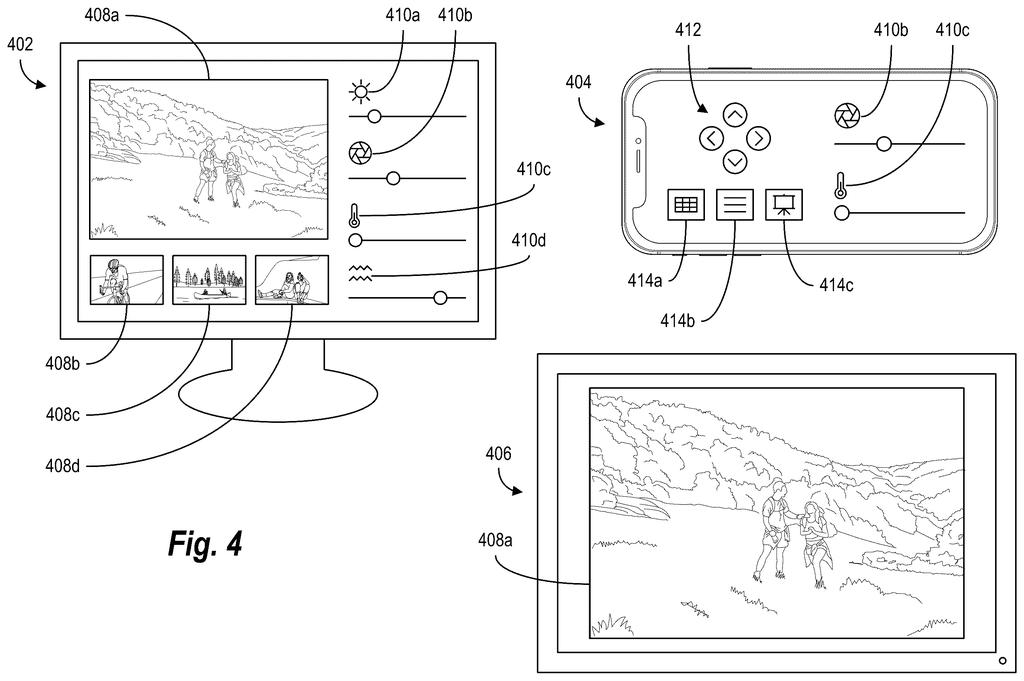
Adobe's patent describes a system where your phone, once it's on the same Wi-Fi network as your computer, can detect that an editing session is already running in the cloud and offer you a control panel right on your screen. Tap a button on your phone, and the instruction goes straight to Adobe's servers, which apply it to your active editing session on the big screen.
The key thing here is that your phone isn't streaming the whole app or mirroring the screen. It's sending lightweight commands through an already-open connection, so there's no need to set up screen-sharing or install a separate remote-desktop tool.
… providing a control user interface on the secondary client device for interacting with the active session of the digital media editing application hosted by the application server and running on the primary client device; …
Translation: Your phone shows a touch screen menu that lets you remotely operate the editing software running on your computer.
How the secondary device finds and controls the live session
The patent describes a two-device setup. The primary client device (your computer) opens a session with an application server that hosts the editing software, establishing what the patent calls an open connection channel. This is the live pipe between your machine and Adobe's cloud.
The secondary client device (your phone or tablet) then scans the local network to find that open connection channel. Once it locates the connection details, it displays a control user interface tailored to whatever the editing app can do, think buttons, sliders, or tool shortcuts rendered on your phone's touchscreen.
When you interact with that phone UI, your phone doesn't send the command to your computer. Instead, it sends the instruction directly to the application server via the same open channel the computer originally established. The server processes the instruction and updates the session, which the computer's screen then reflects.
- The phone discovers the session over the local network, not the internet.
- Commands travel phone-to-server, bypassing the computer entirely.
- The computer's display stays in sync because the server is the source of truth for the session state.
What this could mean for creative workflows on multiple screens
For creative professionals who work with large displays or in studio setups where the keyboard and monitor are not always within easy reach, this kind of system could remove real friction. Instead of configuring a screen-mirroring app or buying a dedicated hardware controller, your phone becomes the peripheral, already in your pocket.
Adobe's run of cloud-editing filings suggests the company is pushing hard to make its apps feel native to multi-device environments. A phone-based controller only makes sense if the editing software itself lives in the cloud, which points toward Adobe's existing push to move tools like Photoshop and Premiere toward server-hosted sessions rather than traditional local installs.
Adobe's 143rd filing in our Adobe coverage since May adds to a run that includes work on resizable transparent images and layered AI scene building.
Anyone who edits video or audio for a living knows the physical awkwardness of the work: you are constantly reaching past a monitor, hunting for a keyboard, or wishing you could scrub through a timeline from across the room. Dedicated hardware controllers exist for this, but they cost hundreds of dollars and only solve part of the problem.
Adobe's filing goes after that daily friction by turning a phone into a remote control for editing software running on a nearby computer. The limitation is real: it only works when both devices share the same network, so the help stops at the studio door.
That constraint keeps this from being a solution to how creative teams collaborate at a distance, but it does match the more ordinary problem precisely: the phone already in your pocket doing nothing while you work.
Get our take in your Top Stories
Liked this breakdown? Add Patentlyze as a preferred source on Google, and our plain-English take shows up more often in your Top Stories the next time Adobe patent news breaks.
There are more where this came from
We read every patent application Big Tech publishes and send you the ones worth knowing. Plain English, free, every week.
The drawings
9 drawing sheets from US 2026/0261476 A1 · click any drawing to enlarge


Show the other 1 sheets

Want this weekly breakdown for a company we don't cover? Patentlyze Pro →
Be the first to weigh in