
Apple
Apple · Software · Filed Jul 22, 2026 · USPTO published Nov 19, 2026 · This week's release
Apple Patents a Voice Assistant That Switches How It Asks You for Missing Details
Talk to your phone and it can hit a gap it can't fill: a missing date, a name, a party size. This Apple patent application covers an assistant that spots the gap and asks you for the answer using a different kind of input than the one you started with.
- Publication number
- US 2026/0367868 A1(US20260367868A1)
- Applicant
- Apple Inc.
- Filed · Published
- Jul 22, 2026 · Nov 19, 2026
- Inventors
- Thomas R. GRUBER, Mohammed A. TAYYEB, Ron C. SANTOS, Madhusudan CHINTHAKUNTA
- Status when we published
- Waiting for an examiner
- Document
- 18 claims
- US classification
- 715/727
- Parent application
- Continuation of 18/653,896 (filed May 2, 2024)(18653896)
What Apple's assistant asks when details are missing
You tell your phone, “Make me a dinner reservation at a sushi place at 7,” and the assistant hits a snag. It still doesn’t know the date or how many people are coming. Apple’s filing points out that assistants are often stuck in a single mode of interaction.
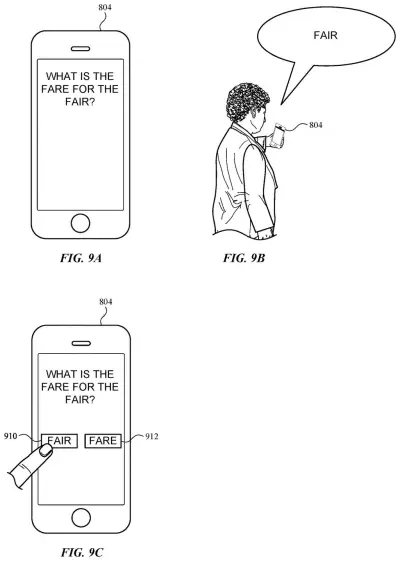
This Apple patent application covers a different move. The assistant works out that it needs more, then asks you for it using a different kind of input than the one you started with. You spoke the request, so the follow-up might ask for something else, such as a touch on the screen.
The device can pick the type of input based on what is missing, whether that is a date or a name, and the filing also lets the situation around the phone play a part. If one more answer is needed after that, it can ask for a third type of input too.
receiving a user input of a first input type, the user input indicative of a task; determining whether additional input is required to perform the task; and in accordance with a determination that additional input is required to perform the task: requesting a user input of a second input type; …
Translation: The assistant figures out when it needs more information to finish what you asked.
How the assistant picks a second kind of input
The core of the claims is a simple check. The device receives a request in one input type (say, your voice) that points to a task. It then decides whether it has enough to do the job. If something is missing, it asks for a second input type, receives it, and finishes the task using that answer.
The claims and the description add several ways to make those decisions:
- Data type: the device works out what kind of information is missing (a date, a name) and looks up which input type suits it.
- Task type: the type of task can itself signal whether more input is needed.
- Device context: the call can depend on the situation of the device. The description lists things like ambient noise, lighting, location and the device's state.
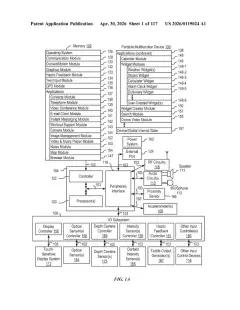
Behind this sits the digital assistant the filing describes. Speech-to-text software turns your words into text, and a language-processing step (software that works out what you mean) matches the request to a task such as a restaurant reservation. That task has slots to fill, like cuisine, time, date and party size. The assistant builds a structured query (a fill-in-the-blank form made from your request), and when slots are empty, it needs more input from you. The claims also cover asking for a third input type afterward.
What this means for talking to your iPhone
The practical payoff, if this ever shows up in some form, is fewer awkward moments with an assistant. Instead of making you repeat or retype everything the same way, your device could request the missing piece in whichever form suits the moment. The filing says this makes the device quicker to use and saves battery, since you finish tasks faster.
The description names iPhone, iPad, laptops, desktop computers, game consoles, TVs and wearables like watches as places this could run. Small screens and hands-busy situations are where switching between speaking and touching tends to matter most, though the filing does not tie the idea to any single product.
This is the 724th Apple filing in our Apple coverage since May, adding to a run that includes a screen-share request button and live mic-switching translation.
Source: US 2026/0367868 A1 at the USPTO (PDF). Full patent text and figures are in the official publication.
Get our take in your Top Stories
Liked this breakdown? Add Patentlyze as a preferred source on Google, and our plain-English take shows up more often in your Top Stories the next time Apple patent news breaks.
Add Patentlyze on Google
One click.
There are more where this came from
We read every patent application Big Tech publishes and send you the ones worth knowing. Plain English, free, every week.
The drawings · 21 sheets
21 drawing sheets from US 2026/0367868 A1 · click any drawing to enlarge


Show the other 13 sheets


More from Apple
All 748 Apple patents →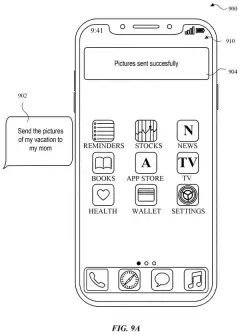
More in Software
All 814 Software patents →
Google
A New Google Patent Picks Which Voice Assistant Gets Priority on Each Speaker
Samsung
Samsung Patents Screenshots That Automatically Remove the Voice Assistant Overlay
Google
Google Files Patent to Delay Assistant Updates Until You Finish Editing Settings
Samsung
No comments yet