
Apple
Apple · Software · Filed Sep 18, 2025 · USPTO published Nov 19, 2026 · This week's release
Apple Files Patent for a Wallet That Groups Your Passes by Trip Destination
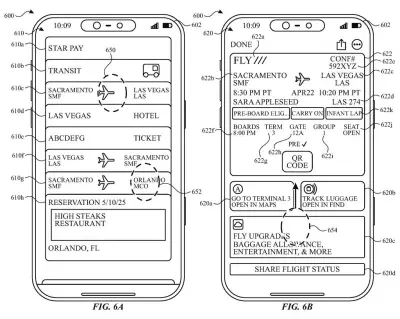
Tap your boarding pass in Apple Wallet and, under this patent application, you'd also see your hotel booking, your event ticket and a suggested transit card for the city you're flying to. The screen changes based on where you're going.
- Publication number
- US 2026/0368655 A1(US20260368655A1)
- Applicant
- Apple Inc.
- Filed · Published
- Sep 18, 2025 · Nov 19, 2026
- Inventors
- Elsma RAMIREZ
- Status when we published
- Examiner raised objections; the company can respond
- Document
- 18 claims
- US classification
- 705/5
- Examiner
- MOLNAR, HUNTER A (Art Unit 3628)
- Parent application
- Claims priority from a provisional application 63819943 (filed Jun 8, 2025)
What Apple's destination-based Wallet screen does
Right now, your phone's wallet is a stack of cards. Your flight, your hotel confirmation and your concert ticket for the same weekend all sit as separate items, and you have to dig for each one. Apple describes that kind of digging as cumbersome, wasting your time and your battery.
This patent application describes a different approach. When you tap one pass, say a boarding pass to Las Vegas, the screen also shows other passes tied to that destination. Fly somewhere else and the related items change to match. Some of those passes are ones you already saved. Others are suggestions you haven't added yet, like a local transit card.
The screen can also hold travel extras: airport maps, luggage tracking, and a button that drafts a message with your flight status.
The present disclosure generally relates to methods and user interfaces for displaying passes and related information.
Translation: Apple describes a new way to organize and display digital tickets and passes on your screen.
How the Wallet screen picks passes per destination
The independent claims cover a simple rule. When you give the phone an input (a tap, for example), it shows a graphical object for one pass that is tied to a destination. It then checks which destination that is and shows a matching set of other passes. A different destination brings up a different set.
The dependent claims add the detail. The related passes can be provisioned (already saved to the phone) or recommended (not yet added). Both kinds can include transit passes, attraction passes, event tickets, hotel reservations and restaurant reservations.
The description walks through a Wallet example. Tapping a Sacramento to Las Vegas boarding pass opens a screen with a map object, a tracking object, an airline object and a flight-status sharing object. Swiping down reveals a destination section with a hotel reservation, an event ticket and a suggested transit card.
Other claims add these features:
- Luggage tracking: if no bag is linked to the pass, the phone starts the process of linking one. If a bag is linked, it shows that bag's information.
- Status with a fallback: it shows current travel status when available, and an estimate when it is not.
- Sharing: it drafts a message already filled in with your current travel status.
- Provider styling: a pass's look and the placement of its details can depend on the airline or other provider.
Why a smarter boarding pass screen matters to you
If this ever reaches your phone, a trip would stop being a pile of separate cards. One tap from your flight could get you to your hotel, your show tickets, a map of the airport and a link to the bag tracker. That saves you from hunting through Wallet while standing in a security line.
The recommended-pass idea also gives Wallet a way to suggest things you haven't added yet. The examiner's first review rejected the claims as filed, which is routine at this stage and usually followed by amendments. Nothing in the filing says this is coming to a product.
That makes this Apple's 708th filing in our Apple coverage since May, adding to work like the floating 3D assistant and the pinch-to-group gesture.
Source: US 2026/0368655 A1 at the USPTO (PDF). Full patent text and figures are in the official publication.
Get our take in your Top Stories
Liked this breakdown? Add Patentlyze as a preferred source on Google, and our plain-English take shows up more often in your Top Stories the next time Apple patent news breaks.
Add Patentlyze on Google
One click.
There are more where this came from
We read every patent application Big Tech publishes and send you the ones worth knowing. Plain English, free, every week.
The drawings · 23 sheets
23 drawing sheets from US 2026/0368655 A1 · click any drawing to enlarge


Show the other 15 sheets


More from Apple
All 748 Apple patents →
More in Software
All 814 Software patents →
Samsung
Samsung Patents a System That Stores and Sends Cryptocurrency Without a Separate App
Meta
Meta Patents a System That Spends More Computing Power on Ads for Active Users
Samsung
Samsung Files Patent for a Before-and-After Slider That Shows What Its Photo Fix Changed
Samsung
No comments yet