
Microsoft
Microsoft · Software · Filed May 19, 2025 · USPTO published Nov 19, 2026 · This week's release
Microsoft Patents an AI That Picks Which Tab You Share in Meetings
Most people who work remotely have shared the wrong tab at least once. Microsoft's patent application describes an AI that listens to the meeting and puts the right tab at the top of your list.
- Publication number
- US 2026/0367760 A1(US20260367760A1)
- Applicant
- MICROSOFT TECHNOLOGY LICENSING, LLC
- Filed · Published
- May 19, 2025 · Nov 19, 2026
- Inventors
- Mrinal Kumar SHARMA
- Status when we published
- Waiting for an examiner
- Document
- 20 claims
- US classification
- 715/739
What Microsoft's screen-share tab picker does
Every time you hit Share screen in a meeting, you get the same awkward few seconds: a row of tabs, a room of waiting colleagues, and a hope that you don't click the one with your personal email. Microsoft's patent application describes a way to skip that scramble.
The idea is that an AI follows the meeting (what people are saying, plus the meeting title and agenda) and looks at what's open in your browser. It then ranks your tabs by how well they match the conversation, so the slide deck about the project rises to the top while the shopping tab sinks. You can click a suggested tab, or the system can pick one for you.
It also watches for mistakes. A tab that looks unrelated to the meeting, or that holds sensitive material, can be left off the list, and you get a warning before it goes out to everyone.
The AI-powered Smart Screen Share Director enables systems to automatically select and share screens in virtual meetings by intelligently identifying the most relevant tab or window based on the meeting's context …
Translation: An artificial intelligence tool picks the right browser tab to share based on what people are discussing in the meeting.
How the AI matches your tabs to the meeting
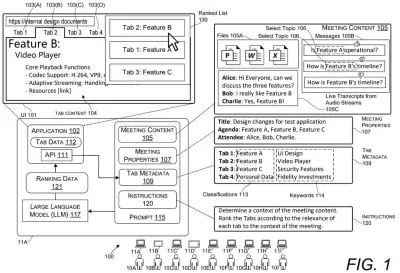
The patent describes a process that runs while a meeting is live. First it gathers meeting content: shared files, chat messages, and a running transcript of the spoken audio, from which it pulls out the main topics. It also reads meeting properties from the calendar invite, such as the title and agenda.
Next it reads details about your open tabs through the browser's API (a built-in doorway that lets other software look at a tab's information). It collects titles, content previews, file names and linked resources, then labels each tab with a classification, such as presentation or project tracker. The labels come from a keyword lookup table or from an AI agent asked to choose.
Then the main step:
- The system writes a prompt (a set of written instructions) for a large language model (LLM, the AI behind chatbots) containing the meeting topics, the agenda, and each tab's labels and keywords.
- The LLM returns a ranked list. Tabs below a relevancy threshold, or flagged as sensitive, are dropped.
- The presenter picks from the list, or in another version the top tab is shown automatically, and it is mirrored to the other participants.
The filing also describes learning from corrections: if you choose a different tab than the one recommended, that choice raises its score next time. It can scan tabs across several browsers at once.
… communicating the prompt to the LLM, causing the LLM to generate ranking data comprising a prioritized list of select tabs that meet one or more ranking thresholds …
Translation: The system feeds meeting details into a large language model to sort and score the open tabs by relevance.
Why this could change your next screen share
If you give presentations over video, this targets two familiar headaches: the delay while you hunt for the right file, and the dread of showing something you shouldn't. A warning that says this tab may not be relevant to the meeting would arrive before everyone else sees the screen.
The filing names Microsoft Teams, Zoom and Google Meet as meeting apps it can detect, and Edge, Chrome and Firefox as browsers it can scan. It also describes the ranked list showing only on the presenter's screen, so the audience never sees which tabs were considered. For companies, the pitch is fewer leaks of private or client material, which is the part of the description that gets the most attention.
This is the 40th Microsoft filing we've tracked since July in AI agents that act for you, following running third-party tools in Office and turning sketches into data systems.
Source: US 2026/0367760 A1 at the USPTO (PDF). Full patent text and figures are in the official publication.
Get our take in your Top Stories
Liked this breakdown? Add Patentlyze as a preferred source on Google, and our plain-English take shows up more often in your Top Stories the next time Microsoft patent news breaks.
Add Patentlyze on Google
One click.
There are more where this came from
We read every patent application Big Tech publishes and send you the ones worth knowing. Plain English, free, every week.
The drawings · 26 sheets
26 drawing sheets from US 2026/0367760 A1 · click any drawing to enlarge


Show the other 18 sheets


More from Microsoft
All 681 Microsoft patents →
More in Software
All 814 Software patents →
Apple
Apple Files Patent for a Voice Assistant That Picks the App Without Being Told
Samsung
Samsung Files Patent for a Screenshot Feature That Sends Coupons and Tickets to the Right App
Google
Google Files Patent to Build a Custom Screen Whenever You Ask for One
Google
No comments yet