
Samsung
Samsung · Software · Filed Jun 29, 2026 · USPTO published Nov 19, 2026 · This week's release
Samsung Files Patent for a TV Screen That Enlarges the Widget You Ask About
Samsung filed a patent application for a TV that answers a spoken question by enlarging the widget that fits and dimming everything else.
- Publication number
- US 2026/0367773 A1(US20260367773A1)
- Applicant
- SAMSUNG ELECTRONICS CO., LTD.
- Filed · Published
- Jun 29, 2026 · Nov 19, 2026
- Inventors
- Celine PARK, Boyoon HUR, Heejin KO, Yongjin SO
- Status when we published
- Waiting for an examiner
- Document
- 20 claims
- US classification
- 715/764
- Parent application
- Continuation of PCT/KR2024/019729 (filed Dec 4, 2024)(PCTKR2024019729)
What Samsung's voice-aware widget screen does
Every time you ask your TV a question, the answer tends to land on top of whatever was already on screen. Ask about the weather and the forecast can cover the clock or the notes you left up. Samsung's filing says that spoils the look of the screen and wastes the small panels, called widgets, that you chose to display.
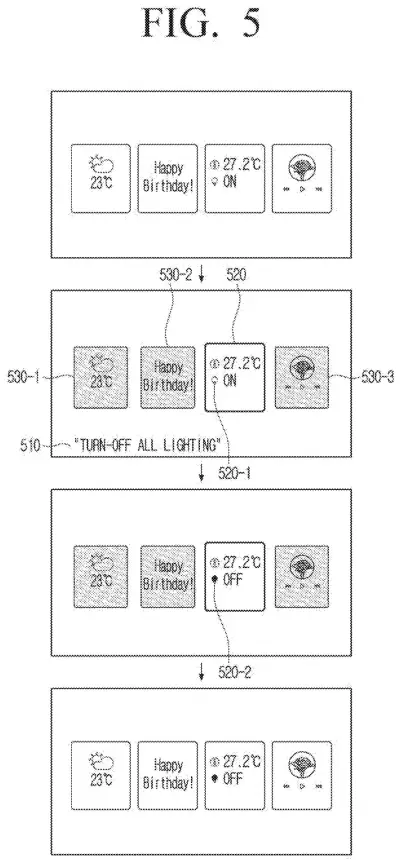
Samsung's fix is to have the TV work out which widget matches what you said, then enlarge that one while dimming the others. Ask 'how is the weather today?' and the weather widget grows and shows today's forecast inside itself. Say 'turn off all lighting' and the home-control widget grows, with its light icon flipping from on to off.
If nothing on screen fits your request, say you ask for music, the TV adds a music widget, enlarges it, and dims the rest.
… obtain a user uttered voice, and based on identifying a first widget that corresponds to the user uttered voice among the one or more widgets, control the display to change a display state of the first widget.
Translation: Listen to a voice command and resize the widget you asked about.
How the TV picks and enlarges the right widget
The filing describes a screen (the main example is a TV) that shows several widgets, small windows each tied to an app, such as weather, memo, smart home, music and calls. When you speak, the device uses voice recognition (software that works out what you asked for) to find the widget that matches.
Then it changes how that widget looks. In the main version, it enlarges the matched widget and dims the rest, then shows the answer inside the enlarged widget. If no widget fits, it adds one and does the same. The description says that after a preset time with no more speech, the widget shrinks back and the dimming lifts.
Other claims add extras:
- A text message containing a preset keyword, such as 'birthday,' can trigger stored content like a cake image. A version of this waits until a sensor spots the person the message is about.
- Sensors can choose which widgets to show based on who is present, the time of day, or sounds in the room. With several people present, the filing describes showing a public widget, one without personal details.
- The device can watch for changes in its Wi-Fi signal (called channel state information) to notice something has entered the room, and only then switch its sensor on, which saves power.
- A phone connecting over Bluetooth, or weather data arriving from a server, can also change which widget appears.
What this means for Samsung's TV home screen
Voice assistants on TVs usually answer by throwing something onto the screen. This patent application aims to make the answer fit into the layout you already set up, so a glance tells you what the TV heard and what it did. That matters most for a TV that sits idle as a clock, calendar or photo frame between shows.
The extras point toward a home screen that rearranges itself around who walks in, what time it is, and even what the room sounds like. That is handy, but it also means cameras and microphones doing more work in your living room. The filing describes keeping the sensor off until a change in the Wi-Fi signal suggests someone is there.
That makes this Samsung's 135th filing we've tracked in our display technology watchlist since May, adding to work like the face-tracking 3D screen and wall-glow message lights.
Source: US 2026/0367773 A1 at the USPTO (PDF). Full patent text and figures are in the official publication.
Get our take in your Top Stories
Liked this breakdown? Add Patentlyze as a preferred source on Google, and our plain-English take shows up more often in your Top Stories the next time Samsung patent news breaks.
Add Patentlyze on Google
One click.
There are more where this came from
We read every patent application Big Tech publishes and send you the ones worth knowing. Plain English, free, every week.
The drawings · 19 sheets
19 drawing sheets from US 2026/0367773 A1 · click any drawing to enlarge


Show the other 11 sheets


More from Samsung
All 1,662 Samsung patents →
More in Software
All 814 Software patents →
Samsung
Samsung Files Patent for a Floating Screen That Watches Your Hand Through the Glass
Samsung
Samsung Files Patent to Let a Smartphone Screen Recognize Which Ring Is Sitting on It
Samsung
Samsung Files Patent for a Smartwatch Whose Strap Is Part of the Screen
Samsung
No comments yet