
Apple
Apple · AI / ML · Filed Jan 5, 2026 · USPTO published Nov 19, 2026 · This week's release
Apple Files Patent for Making New Emoji by Mixing Two or Typing a Description
Apple has filed a patent application for an emoji screen that makes a brand-new emoji from words you type or from two emoji you tap. If you've ever typed two emoji in a row to say one thing, it also offers to merge them into a single image.
- Publication number
- US 2026/0368948 A1(US20260368948A1)
- Applicant
- Apple Inc.
- Filed · Published
- Jan 5, 2026 · Nov 19, 2026
- Inventors
- Grant R. PAUL
- Status when we published
- Waiting for an examiner
- Document
- 36 claims
- US classification
- 715/201
- Parent application
- Claims priority from a provisional application 63808536 (filed May 19, 2025)
What Apple's custom emoji maker actually does
Every time you reach for an emoji and the exact one you want isn't there, you settle for the closest match. Apple's patent application describes a screen built to fix that by making a new emoji on the spot.
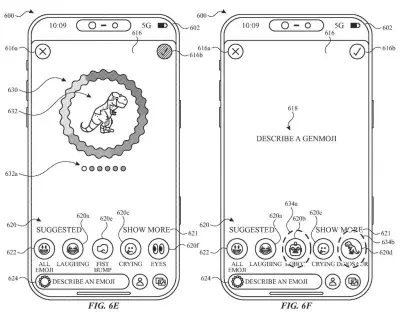
You get a box to type in and a row of suggested emoji. Type a few words, and the phone generates a new emoji from them. Or tap any two of the suggestions, and it generates a new emoji built from both.
If the result isn't right, you can tweak it. The filing describes removing one word from your description, or dropping one of the two emoji, and generating again. And if you've typed two or more emoji in a message, the phone can offer to swap them for one merged emoji.
The present disclosure generally relates to techniques and user interfaces for providing generative content.
Translation: This patent covers new software controls for creating AI generated content.
How a text prompt or two emoji become one
The screen in the claims shows two things at once: a text entry field and a row of image-based emoji suggestions. What happens next depends on what you do.
- You type words: the system starts generating a new emoji from that text, using a generative model (an AI program that creates new images instead of picking from a fixed library).
- You tap at least two suggestions: it generates a new emoji based on both. A dependent claim says the result combines the two.
While it works, the screen shows an indicator that an emoji is being made, along with your words or your two picks. Removal options let you drop one term, or one of the emoji, and regenerate. The filing also describes using different generative models for the two routes, and turning each picked emoji into a short text description before feeding it to the model alongside any typed words.
Other claims cover follow-up edits: add a third emoji, show the emoji as separate objects instead of one blended image, or type how they interact. Suggestions can be chosen from text on an earlier screen, and past generated emoji can reappear as suggestions. In a message, typing two or more emoji triggers a prompt to merge them, and accepting swaps them for the new one.
initiating a process for generating a new generative emoji that is generated in response to the first set of one or more user inputs and based on the first set of text; …
Translation: The system starts making a custom emoji as soon as you type out a description.
What this means for your emoji keyboard
For you, this would mean fewer trips through the emoji keyboard hunting for a near match. You describe what you want, or mash two emoji together, and your message gets a custom reaction. The merge prompt is the most practical touch: type two emoji and your phone offers to turn them into one.
For Apple, it puts image generation right where you already type, the messaging screen the claims describe. The filing's own pitch is fewer taps, less time and less battery spent. It could connect to Apple's existing Genmoji feature, but this is a patent application, not a product announcement.
That makes this the fourth Apple filing we've tracked under Enterprise AI topic since June, joining one that fixes dictated messages by voice and one that surfaces tasks by location.
Source: US 2026/0368948 A1 at the USPTO (PDF). Full patent text and figures are in the official publication.
Get our take in your Top Stories
Liked this breakdown? Add Patentlyze as a preferred source on Google, and our plain-English take shows up more often in your Top Stories the next time Apple patent news breaks.
Add Patentlyze on Google
One click.
There are more where this came from
We read every patent application Big Tech publishes and send you the ones worth knowing. Plain English, free, every week.
The drawings · 23 sheets
23 drawing sheets from US 2026/0368948 A1 · click any drawing to enlarge


Show the other 15 sheets


More from Apple
All 748 Apple patents →
More in AI / ML
All 2,738 AI / ML patents →
IBM
IBM Files Patent to Let You Build an AI Model by Typing a Sentence
Adobe
Adobe's New Patent Turns a Single Description Into a Finished, Ready-to-Use Page
Microsoft
Microsoft Patents an AI That Builds Apps From a Written Description
Google
No comments yet