Get the newsletter
Apple · Software · Filed Jan 21, 2026 · USPTO published Nov 19, 2026 · This week's release

Apple Patents Live Phone Call Translation That Still Lets You Hear the Original Voice

Apple's patent application describes a phone call where a translated voice plays alongside the original speaker's, each at its own volume, so you hear how the person actually sounds as well as what they said.
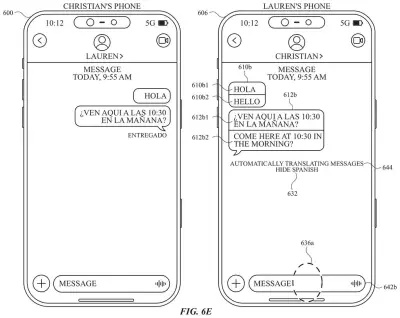
Two smartphones in a chat thread displaying translated English text directly beneath each original Spanish message bubble. Drawing from patent filing US 2026/0368456 A1.
Two smartphones in a chat thread displaying translated English text directly beneath each original Spanish message bubble.All 59 drawings ↓
Publication number
US 2026/0368456 A1(US20260368456A1)
Applicant
Apple Inc.
Filed · Published
Jan 21, 2026 · Nov 19, 2026
Inventors
Eunice Y. LEE, Jarrett A. FORD, Mitchell R. LERNER
Status when we published
Waiting for an examiner
Document
31 claims
US classification
704/2
Parent application
Claims priority from a provisional application 63807487 (filed May 16, 2025)

What Apple's live call translation actually does

Turning on translation on a phone today usually means hunting through menus and tapping several times, which is a poor fit for a moment when someone is already talking to you. Apple's patent application tries to cut that down to one prompt.

When you place or answer a call, your phone checks whether the other person's number points to a foreign language. If it does, a button appears offering to translate. Tap it and you hear the translated version in your language while the original voice keeps playing at a different volume, so you still catch how the caller sounds.

What you say can be translated back for the other side, and a text transcript can appear on your screen too. If the language files aren't on your phone yet, the same prompt can download them.

From the filing · THE ABSTRACT
The present disclosure generally relates to user interfaces for activating automatic translation of audio and text during a communication session as well as user interfaces for sharing a user representation with one or more contacts.

Translation: The patent covers screen controls for turning on live translation during phone calls and sharing your digital avatar.

How the phone mixes the original and translated voice

The claims cover a call-handling routine on a phone or similar device. When a call starts, the device checks whether translation criteria are met. One example is the other person's phone number pointing to a foreign language, based on the region the number belongs to. If the test passes, an option to turn on automatic translation mode appears. If it fails, the option stays hidden.

Once the mode is on, the incoming voice still plays in its original language at one volume, and a translated version plays at a different volume. That second volume can match your phone's current volume setting. The claims also cover the two voices overlapping, with the original louder at first and dropping once the translation joins in. The device can generate the translated audio itself.

Around that core, the filing describes several extras:

  • A suggested language, with a one-tap download of its language model (the files a phone needs to translate that language) if it isn't installed.
  • A spoken notice, in both languages, that the call is being translated.
  • An on-screen transcript that can show both languages side by side, plus a button to switch translation off.
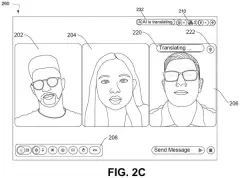
  • A button during calls with unknown callers, and a translated transcript for live video calls.
  • If the other person's phone is already translating, your phone can play translated audio and skip the transcript.

The same filing also describes translating text messages and a screen for sharing a custom representation of yourself with contacts, though the claims here center on calls.

Why phone calls across languages could get easier

If this reached your phone, a call with someone who speaks another language could start with a single prompt instead of a scavenger hunt through settings. Keeping the original voice audible matters too: you can pick up tone and hesitation while the translation gives you the words. The filing's focus on calls and live video calls points to everyday uses, like phoning relatives abroad.

For Apple, the patent is mostly about interface steps: when to offer translation, which language to suggest, and when to download language files. That is the detail work that makes a feature feel automatic. A patent application is not a product, and nothing here says whether or when Apple would ship anything like it.

This is the 714th Apple filing in our Apple coverage since May, adding to a thread that includes tap-to-translate earphones and live call translation.

Source: US 2026/0368456 A1 at the USPTO (PDF). Full patent text and figures are in the official publication.

Get our take in your Top Stories

Liked this breakdown? Add Patentlyze as a preferred source on Google, and our plain-English take shows up more often in your Top Stories the next time Apple patent news breaks.

There are more where this came from

We read every patent application Big Tech publishes and send you the ones worth knowing. Plain English, free, every week.

The drawings · 59 sheets

59 drawing sheets from US 2026/0368456 A1 · click any drawing to enlarge

Hardware parts and programs inside a touch-screen phone, drawing sheet 1 from US 2026/0368456 A1
Sheet 1 Hardware parts and programs inside a touch-screen phone
Software tracking taps and gestures on the screen, drawing sheet 2 from US 2026/0368456 A1
Sheet 2 Software tracking taps and gestures on the screen
External controls and sensors across the phone body, drawing sheet 3 from US 2026/0368456 A1
Sheet 3 External controls and sensors across the phone body
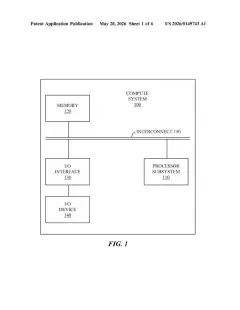
Computer components and memory storing device programs, drawing sheet 4 from US 2026/0368456 A1
Sheet 4 Computer components and memory storing device programs
Two ways software requests and processes background tasks, drawing sheet 5 from US 2026/0368456 A1
Sheet 5 Two ways software requests and processes background tasks
Structure allowing phone apps to communicate with core services, drawing sheet 6 from US 2026/0368456 A1
Sheet 6 Structure allowing phone apps to communicate with core services
Message exchanges between an active app and system tools, drawing sheet 7 from US 2026/0368456 A1
Sheet 7 Message exchanges between an active app and system tools
Home screen layout organizing built-in apps and widgets, drawing sheet 8 from US 2026/0368456 A1
Sheet 8 Home screen layout organizing built-in apps and widgets
Show the other 51 sheets
Controlling a separate screen using gestures on a touchpad, drawing sheet 9 from US 2026/0368456 A1
Sheet 9 Controlling a separate screen using gestures on a touchpad
Touchscreen watch face paired with physical side buttons, drawing sheet 10 from US 2026/0368456 A1
Sheet 10 Touchscreen watch face paired with physical side buttons
Internal parts and sensors that power a smartwatch, drawing sheet 11 from US 2026/0368456 A1
Sheet 11 Internal parts and sensors that power a smartwatch
Prompts offering to automatically translate texts in a foreign language, drawing sheet 12 from US 2026/0368456 A1
Sheet 12 Prompts offering to automatically translate texts in a foreign language
Selecting which language pack to download for live text translation, drawing sheet 13 from US 2026/0368456 A1
Sheet 13 Selecting which language pack to download for live text translation
Choosing a preferred translation language for text and voice calls, drawing sheet 14 from US 2026/0368456 A1
Sheet 14 Choosing a preferred translation language for text and voice calls
Downloading a language model in the dynamic island while texting, drawing sheet 15 from US 2026/0368456 A1
Sheet 15 Downloading a language model in the dynamic island while texting
Reading foreign texts alongside their direct English translations, drawing sheet 16 from US 2026/0368456 A1
Sheet 16 Reading foreign texts alongside their direct English translations
Previewing an outgoing message translated before you send it, drawing sheet 17 from US 2026/0368456 A1
Sheet 17 Previewing an outgoing message translated before you send it
Letting the other person know you are using live translation, drawing sheet 18 from US 2026/0368456 A1
Sheet 18 Letting the other person know you are using live translation
Long pressing a translated text message to edit it, drawing sheet 19 from US 2026/0368456 A1
Sheet 19 Long pressing a translated text message to edit it
Updating the text and translation of an already sent chat, drawing sheet 20 from US 2026/0368456 A1
Sheet 20 Updating the text and translation of an already sent chat
Showing an edited label next to the updated translated message, drawing sheet 21 from US 2026/0368456 A1
Sheet 21 Showing an edited label next to the updated translated message
Hiding the original language to keep your chat view simple, drawing sheet 22 from US 2026/0368456 A1
Sheet 22 Hiding the original language to keep your chat view simple
Receiving incoming messages automatically turned into your language, drawing sheet 23 from US 2026/0368456 A1
Sheet 23 Receiving incoming messages automatically turned into your language
Turning off automatic translation inside a contact's details menu, drawing sheet 24 from US 2026/0368456 A1
Sheet 24 Turning off automatic translation inside a contact's details menu
Two phones showing the same chat translated for both participants, drawing sheet 25 from US 2026/0368456 A1
Sheet 25 Two phones showing the same chat translated for both participants
Receiving translated text messages directly on the lock screen, drawing sheet 26 from US 2026/0368456 A1
Sheet 26 Receiving translated text messages directly on the lock screen
Toggling automatic translation inside a group chat settings menu, drawing sheet 27 from US 2026/0368456 A1
Sheet 27 Toggling automatic translation inside a group chat settings menu
Choosing which language to translate for a group conversation, drawing sheet 28 from US 2026/0368456 A1
Sheet 28 Choosing which language to translate for a group conversation
Previewing translated text before sending it to a group, drawing sheet 29 from US 2026/0368456 A1
Sheet 29 Previewing translated text before sending it to a group
Managing group chat translation settings on a laptop, drawing sheet 30 from US 2026/0368456 A1
Sheet 30 Managing group chat translation settings on a laptop
How the phone detects a foreign language and offers translation, drawing sheet 31 from US 2026/0368456 A1
Sheet 31 How the phone detects a foreign language and offers translation
Downloading voice packs to translate live phone calls, drawing sheet 32 from US 2026/0368456 A1
Sheet 32 Downloading voice packs to translate live phone calls
Choosing call languages and tapping a web phone number, drawing sheet 33 from US 2026/0368456 A1
Sheet 33 Choosing call languages and tapping a web phone number
Prompting to translate a call before dialing, drawing sheet 34 from US 2026/0368456 A1
Sheet 34 Prompting to translate a call before dialing
Announcing live translation to both callers as the call begins, drawing sheet 35 from US 2026/0368456 A1
Sheet 35 Announcing live translation to both callers as the call begins
Playing translated incoming audio alongside a live text transcript, drawing sheet 36 from US 2026/0368456 A1
Sheet 36 Playing translated incoming audio alongside a live text transcript
Speaking back with translated audio sent to the other caller, drawing sheet 37 from US 2026/0368456 A1
Sheet 37 Speaking back with translated audio sent to the other caller
Viewing both languages and opening in-call translation controls, drawing sheet 38 from US 2026/0368456 A1
Sheet 38 Viewing both languages and opening in-call translation controls
Switching call languages and selecting a business in Maps, drawing sheet 39 from US 2026/0368456 A1
Sheet 39 Switching call languages and selecting a business in Maps
Downloading a language pack before placing an overseas call, drawing sheet 40 from US 2026/0368456 A1
Sheet 40 Downloading a language pack before placing an overseas call
Opening in-call options to turn on live spoken translation, drawing sheet 41 from US 2026/0368456 A1
Sheet 41 Opening in-call options to turn on live spoken translation
Selecting languages for speech translation during calls, drawing sheet 42 from US 2026/0368456 A1
Sheet 42 Selecting languages for speech translation during calls
Showing live text translations while playing spoken audio, drawing sheet 43 from US 2026/0368456 A1
Sheet 43 Showing live text translations while playing spoken audio
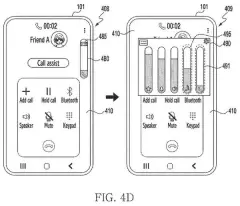
How the phone balances original and translated voice levels, drawing sheet 44 from US 2026/0368456 A1
Sheet 44 How the phone balances original and translated voice levels
Navigating from the home screen into recent conversations, drawing sheet 45 from US 2026/0368456 A1
Sheet 45 Navigating from the home screen into recent conversations
Choosing a personal avatar to share with contacts, drawing sheet 46 from US 2026/0368456 A1
Sheet 46 Choosing a personal avatar to share with contacts
Setting up a full contact poster for video calls, drawing sheet 47 from US 2026/0368456 A1
Sheet 47 Setting up a full contact poster for video calls
Prompting photo setup directly inside the video call app, drawing sheet 48 from US 2026/0368456 A1
Sheet 48 Prompting photo setup directly inside the video call app
Prompting to share a profile card with contacts, drawing sheet 49 from US 2026/0368456 A1
Sheet 49 Prompting to share a profile card with contacts
How the phone offers to share your profile card, drawing sheet 50 from US 2026/0368456 A1
Sheet 50 How the phone offers to share your profile card
Picking an avatar image or custom monogram for your profile, drawing sheet 51 from US 2026/0368456 A1
Sheet 51 Picking an avatar image or custom monogram for your profile
Typing custom initials and styling your contact monogram, drawing sheet 52 from US 2026/0368456 A1
Sheet 52 Typing custom initials and styling your contact monogram
Customizing an animated sticker avatar for incoming calls, drawing sheet 53 from US 2026/0368456 A1
Sheet 53 Customizing an animated sticker avatar for incoming calls
Selecting a full poster design and setting your display name, drawing sheet 54 from US 2026/0368456 A1
Sheet 54 Selecting a full poster design and setting your display name
Pinning a saved card inside the messages app, drawing sheet 55 from US 2026/0368456 A1
Sheet 55 Pinning a saved card inside the messages app
Opening your shared poster directly from the phone call log, drawing sheet 56 from US 2026/0368456 A1
Sheet 56 Opening your shared poster directly from the phone call log
Deciding whether to share your contact poster automatically, drawing sheet 57 from US 2026/0368456 A1
Sheet 57 Deciding whether to share your contact poster automatically
Designing and sharing a contact card on your phone, drawing sheet 58 from US 2026/0368456 A1
Sheet 58 Designing and sharing a contact card on your phone
Updating your shared contact card and privacy settings later, drawing sheet 59 from US 2026/0368456 A1
Sheet 59 Updating your shared contact card and privacy settings later
Patent filing page

Reader comments

No comments yet

Start the discussion

Real name or a handle, either is fine. Comments are read by a person before they appear, so allow a little time. Keep it about the filing.