
Apple
Apple · Software · Filed Jan 5, 2026 · USPTO published Nov 19, 2026 · This week's release
Apple Patents a Call Screen That Hears Hold Music and Offers a Hold Button
Apple has filed a patent application for a call screen that listens for the signs you've been parked on hold, like music or a recorded message, and only then offers a Hold button. It also describes a transcript of what the other side says while you step away.
- Publication number
- US 2026/0370756 A1(US20260370756A1)
- Applicant
- Apple Inc.
- Filed · Published
- Jan 5, 2026 · Nov 19, 2026
- Inventors
- Jae Woo CHANG, Edward CHAO
- Status when we published
- Waiting for an examiner
- Document
- 16 claims
- US classification
- 379/393
- Parent application
- Claims priority from a provisional application 63808517 (filed May 19, 2025)
What Apple's hold-button call screen actually does
Your phone's call screen shows the same set of buttons whether you're chatting with a friend or listening to a looped jingle. Apple's patent application calls today's call interfaces cumbersome, with extra taps that waste your time and battery.
Apple's fix is a call screen that pays attention to what it hears. If the audio looks like hold music, a recorded message, or silence on the line, a Hold button appears. If you're in a real conversation, the button stays out of the way.
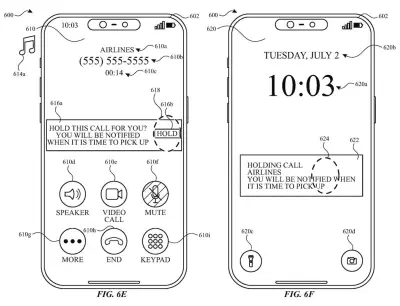
Tap it and the call is put on hold, the call sound stops, and you can move to your lock screen, home screen or another app while a visual indicator shows the call is on hold. The filing even describes a live transcript of what the other side says in the meantime.
… displaying, via the one or more display generation components, a hold option that, when selected, causes the computer system to initiate a process for putting the active communication session on hold …
Translation: The phone shows a special hold button on your screen when it figures out you are waiting on hold.
How the iPhone decides when to show Hold
The patent covers a call screen that reacts to what it detects in the audio of an active call. While the call is up, the system checks that audio against a set of hold criteria (rules for deciding when a hold option makes sense). If the rules are met, a Hold option appears. If they aren't, the option stays hidden.
The filing lists several signals the rules can use:
- Other participants are sending music into the call.
- Someone is sending an automated message.
- Neither you nor the other people are speaking.
- You aren't speaking, or you have turned on mute.
Selecting Hold starts the hold process, shows an on-hold indicator, and stops the call's audio output on your device. While the call is on hold, that indicator can sit next to your lock screen, your home screen, or an open app. If other participants talk into the call, a transcript of their words can appear on screen.
If the button isn't showing, you can still ask for hold with other inputs, and the same on-hold indicator appears. The description also covers a second set of embodiments: putting a call on hold and showing a screen unrelated to the call at the same moment.
Why hold music could become your phone's job
The practical win is getting your attention back. Calls to banks, airlines and support lines often include long stretches of music or recordings, and a Hold button that appears at the right moment saves you from hunting for it. A transcript means stepping away doesn't have to mean missing the person who finally picks up. It also works the other way: a button that stays hidden during a real conversation keeps the screen simple.
For Apple, this would be a small change to the calling experience on a smartphone, and the filing names the iPhone as an example device. It is a patent application, so nothing here says it will ship, and the text we saw doesn't spell out how the audio is judged beyond the signals it lists.
This is the 684th Apple filing in our Apple coverage since May, adding to work like call screening replies and split camera alerts.
Source: US 2026/0370756 A1 at the USPTO (PDF). Full patent text and figures are in the official publication.
Get our take in your Top Stories
Liked this breakdown? Add Patentlyze as a preferred source on Google, and our plain-English take shows up more often in your Top Stories the next time Apple patent news breaks.
Add Patentlyze on Google
One click.
There are more where this came from
We read every patent application Big Tech publishes and send you the ones worth knowing. Plain English, free, every week.
The drawings · 26 sheets
26 drawing sheets from US 2026/0370756 A1 · click any drawing to enlarge


Show the other 18 sheets


More from Apple
All 748 Apple patents →
More in Software
All 814 Software patents →
Samsung
Samsung Files Patent to Slow Any Video Moment While You Press and Hold
Samsung
Samsung Files Patent for One Volume Button That Handles a Call and Its Translation
Sony
Sony Patents a Physical Reaction Button Built Into Game Controllers
Sony
No comments yet