
Apple
Apple · Software · Filed Dec 15, 2025 · USPTO published Nov 19, 2026 · This week's release
Apple Files Patent for Call Screening That Lets You Reply Without Answering
Apple's patent application describes a phone that hands unknown callers to a digital assistant, can skip the ringtone, and still lets you send them a voice message without ever picking up.
- Publication number
- US 2026/0370757 A1(US20260370757A1)
- Applicant
- Apple Inc.
- Filed · Published
- Dec 15, 2025 · Nov 19, 2026
- Inventors
- Jae Woo CHANG, Grant R. PAUL
- Status when we published
- Waiting for an examiner
- Document
- 17 claims
- US classification
- 379/142.04
- Parent application
- Claims priority from a provisional application 63808440 (filed May 19, 2025)
What Apple's call screening patent actually does
Every time an unknown number lights up your phone, you make the same quick bet: pick up and risk a sales pitch, or let it ring and risk missing something that matters. This Apple patent application tries to take that bet off your plate.
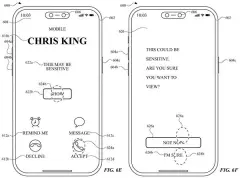
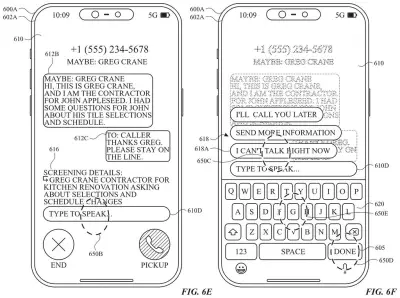
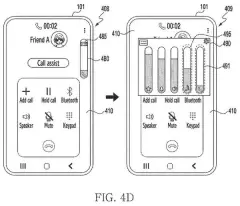
When someone you know calls, you would see a normal incoming call screen, with a button to reply with a voice message instead of answering. When a stranger calls, a digital call assistant gets involved and you see a screening notification instead. Tap it and you can see what the assistant is up to, plus your own button to send the caller an audio message without answering.
The filing also describes skipping the ringtone for those unknown callers, so your phone stays quiet while the assistant handles things. Afterward, the call shows up in a list, where you can mark the caller as someone you know.
… displaying a first reply element that when selected initiates a process for providing an audio message to the caller in the call without answering the call …
Translation: Showing a button that lets you send an audio message to the caller without picking up the phone
How the assistant handles unknown callers
The first independent claim covers a decision the phone makes while a call is still ringing: it sorts the caller into one of two types. The filing's own example of the second type is an unknown caller.
For the first type, the phone shows a regular incoming call screen with a reply element (a button) that starts a process for sending the caller an audio message without answering. For the second type, it shows a call screening notification while a digital call assistant (software that deals with the call on your behalf) is active. Selecting that notification reveals a second reply button that does the same job.
The dependent claims fill in the details:
- The screening notification has no accept button. The screening screen you open from it does.
- That screen shows information about the assistant, its status, a description of the message the assistant played to the caller, and a description of the caller's audio.
- The notification updates when the assistant's status changes.
- Unknown callers get no ringtone at first, but the phone can ring later if a set of screening criteria is met.
- Afterward, the call appears in a list with a control to designate the caller as the first (known) type.
The description also covers two related ideas outside these claims: a list of items from unknown senders where you can mark them as known, and a restricted mode where you can send a request to approve contact with someone not on a permitted list.
… techniques for managing communications, including techniques for screening calls, filtering communication items, and managing communication requests …
Translation: Methods for handling incoming phone calls, filtering messages, and organizing communication requests
What this means for unknown callers on iPhone
The practical gain is for anyone who dreads unknown numbers. Instead of choosing between answering and ignoring, you could let a digital assistant take the call, glance at a notification, and decide. You could also send a voice message back to the caller without picking up, and the claims allow that for known callers too.
The filing also points to some housekeeping around the Phone app. After a screened call, the caller appears in a call list with a control to mark them as someone you know, so they get the regular call screen next time. A patent is not a product, so nothing here says when, or whether, you will see any of it.
That makes this Apple's 683rd filing we've tracked in our Apple coverage since May, adding to work like splitting camera alerts and health-flagging video timelines.
Source: US 2026/0370757 A1 at the USPTO (PDF). Full patent text and figures are in the official publication.
Get our take in your Top Stories
Liked this breakdown? Add Patentlyze as a preferred source on Google, and our plain-English take shows up more often in your Top Stories the next time Apple patent news breaks.
Add Patentlyze on Google
One click.
There are more where this came from
We read every patent application Big Tech publishes and send you the ones worth knowing. Plain English, free, every week.
The drawings · 77 sheets
77 drawing sheets from US 2026/0370757 A1 · click any drawing to enlarge


Show the other 52 sheets


Sheets 61 to 77 are in the full USPTO filing.
More from Apple
All 748 Apple patents →
More in Software
All 814 Software patents →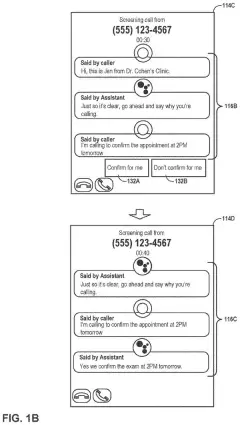
Google
Google Files Patent for Answering Phone Calls by Tapping Instead of Talking
IBM
IBM Patents a System That Scores Your Video Call Setup and Tells You What to Fix
Google
Google Files Patent for Video Call Blur That Doesn't Flicker When You Move
Samsung
No comments yet