
Apple
Apple · AR / VR · Filed Jul 22, 2026 · USPTO published Nov 19, 2026 · This week's release
Apple Patents a Fingertip Device for Tapping and Dragging Items in a Headset
Apple's patent application describes a fingertip cradle that leaves your finger pad bare, so a plain tabletop can feel like a keyboard you can click.
- Publication number
- US 2026/0367708 A1(US20260367708A1)
- Applicant
- Apple Inc.
- Filed · Published
- Jul 22, 2026 · Nov 19, 2026
- Inventors
- Paul X. Wang, Alex J. Lehmann, Michael J. Rockwell, Michael Y. Cheung, Ray L. Chang, Hongcheng Sun, Ian M. Bullock, Kyle J. Nekimken, Madeleine S. Cordier, Seung Wook Kim, David H. Bloom, Scott G. Johnston
- Status when we published
- Waiting for an examiner
- Document
- 20 claims
- US classification
- 715/702
- Parent application
- Continuation of 18/425,962 (filed Jan 29, 2024)(18425962)
What Apple's fingertip headset controller does
Gloves are one way to control a headset, but Apple's own filing admits the problem: a glove can dull your sense of touch, feel uncomfortable, and still miss what you meant to do. The fix described here is a small device for each fingertip instead.
It's a little U-shaped cradle that sits over your fingernail and along the sides of your finger. The pad of your fingertip stays bare, so you can still feel the table, the texture of a surface, and the world around you. Sensors inside notice when you press, slide, or tap. You could tap a tabletop to pick a key on a virtual keyboard, then wave your hand to slide something across your view.
A tiny buzz from the device tells you the tap registered, so a flat table can feel a bit like pressing a real button.
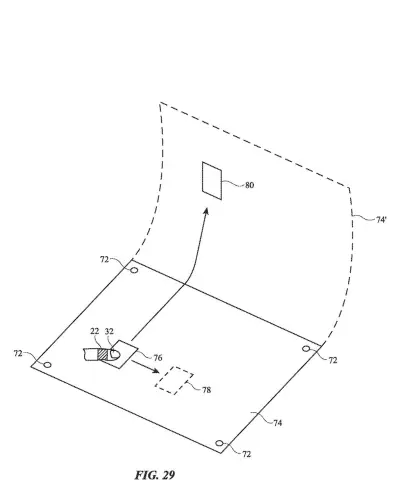
detect a finger tap on an external surface with which a first visual item in the plurality of visual items is selected; and detect a hand wave in air with which a second visual item in the plurality of visual items is moved from a first location to a second location.
Translation: It registers a tap on a table to select an object and a wave in the air to drag it somewhere else.
How the sidewall sensors read presses and slides
The claims cover a device worn on a finger with a body that only partly surrounds it: two sidewalls joined by a top portion that rests by your fingernail. That gives it a U-shaped cross-section, and the finger pad stays exposed. It works with a head-mounted device (a headset with a display) to select and move on-screen items. The filing describes three kinds of input:
- Taps and waves: an accelerometer (a motion sensor, like the one in your phone) catches the sharp jolt of a finger tap on a surface, which selects an item. It also catches a hand wave in the air, which moves an item from one spot to another.
- Presses and slides: force sensors in the sidewalls read how your finger bulges outward when you press down. They also read shear force (a sideways push) when you slide your fingertip across a surface, which acts like a joystick.
- Buzzes: a haptic output device (a tiny vibrating part) can confirm a tap, or give a click-like bump when you drag an item past a set boundary.
One claim covers dragging an item from a table surface up into the air. Another adds infrared lights on the body so the headset's cameras can track your finger. The body can bend or slide, using metal, magnets, or springs, to fit different finger sizes.
… a U-shaped cross-sectional profile that leaves the finger pad of each finger exposed when the body is coupled to a fingertip of a user’s finger.
Translation: The wearable ring is shaped like a horseshoe so your bare fingertip can still touch things normally.
What this means for typing on a table in a headset
The practical payoff is typing and clicking in a headset without giving up your sense of touch. The filing describes tapping a tabletop where a virtual keyboard is displayed, with a small buzz standing in for the click of a real key. Your fingertip pad stays free, so you can still feel the table, a pen, or a coffee cup.
The filing also traces back to a 2017 provisional application, so the idea of a fingertip input device has been around for years. It sets out a concrete claim for how a headset could be controlled with taps, waves, and drags instead of hand-held controllers or gloves. Headset makers keep looking for input that feels natural, and this describes one such answer.
That makes this Apple's 57th filing we've tracked in our eye and hand controls watchlist since May, adding to patents like ignoring a pinch near a pen and fine-tuning where a pinch lands.
Source: US 2026/0367708 A1 at the USPTO (PDF). Full patent text and figures are in the official publication.
Get our take in your Top Stories
Liked this breakdown? Add Patentlyze as a preferred source on Google, and our plain-English take shows up more often in your Top Stories the next time Apple patent news breaks.
Add Patentlyze on Google
One click.
There are more where this came from
We read every patent application Big Tech publishes and send you the ones worth knowing. Plain English, free, every week.
The drawings · 17 sheets
17 drawing sheets from US 2026/0367708 A1 · click any drawing to enlarge


Show the other 9 sheets


More from Apple
All 748 Apple patents →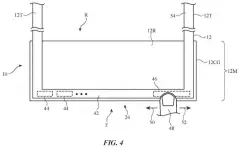
More in AR / VR
All 713 AR / VR patents →
Apple
Apple Patents Floating Controls for Moving and Resizing Virtual Objects by Looking and Pinching
Apple
Apple Patent Reveals Gaze-Based Controls for Hands-Free Vision Pro Operation

Apple
Apple Files Patent to Let Flat-Screen Apps Understand Your Gaze and Touch in 3D
Apple
No comments yet