
Apple
Apple · AI / ML · Filed Dec 3, 2025 · USPTO published Nov 19, 2026 · This week's release
A New Apple Patent Has Your Phone Suggest What to Do With a Photo
Your camera roll is full of menus, receipts and book covers you meant to do something with. Apple's filing describes a phone that looks at the photo, guesses your next move, and learns from what you actually tap.
- Publication number
- US 2026/0369090 A1(US20260369090A1)
- Applicant
- Apple Inc.
- Filed · Published
- Dec 3, 2025 · Nov 19, 2026
- Inventors
- Erik M. BERGET, Ryan S. DIXON, Afshin DEHGHAN, Aya SIBLINI, David A. MUNECHIKA, David N. GRIFFITHS, Eshan VERMA, Guangyu ZHONG, Vinay SHARMA
- Status when we published
- Waiting for an examiner
- Document
- 20 claims
- US classification
- 382/103
- Parent application
- Claims priority from a provisional application 63808609 (filed May 19, 2025)
What Apple's photo-action suggestions actually do
Today, turning a photo of the real world into something useful is mostly manual. You snap a menu, a recipe or a book cover, then copy the text, open another app and type it in. Apple's filing describes that conversion as largely manual and time consuming.
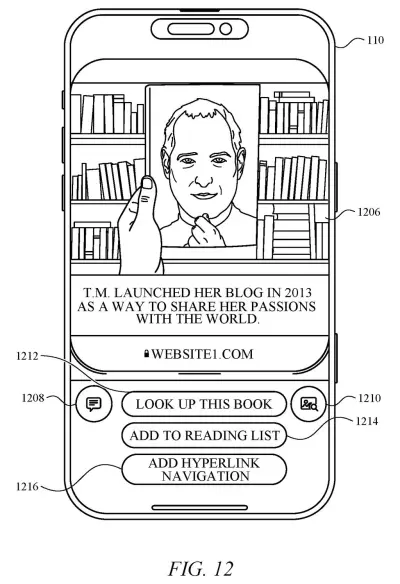
Its answer is a phone that looks at the photo and offers a short list of next steps: look it up, summarize it, add it to a list, or send it to an image search service. The list is ranked, so the most useful choice comes first. A photo of a book might lead with "look up this book," while a recipe could offer to put the ingredients on your grocery list.
The ranking learns from you. Actions you pick often and recently move up, and actions you ignore sink. Over time, the order starts to match your habits.
… processing the input image using a first machine learning model to detect one or more elements within the visual content, wherein the one or more elements include one or more objects in the visual content or one or more textual portions of the visual content; …
Translation: AI scans the picture to find objects and text.
How Apple ranks Add to Calendar above Summarize
The process starts when a photo reaches the device, from the camera or from storage. A first machine learning model (software trained on many labeled examples) finds the objects and text in it and tags each with a short grounding label, such as "book" or "menu."
From those labels, the system builds a set of candidate actions: visual search, summarizing, an "add to" action, or a link to a web page. A prompt engine can also write suggested questions, like "identify architect" for a photo of a building, and can infer new prompts from your past queries.
Then the actions are ranked using several signals:
- Action richness: specific outcomes like "Add to Calendar" outrank vague ones like "Summarize."
- Label relevance: a label like "book" maps to content and app categories, with a confidence score at each step.
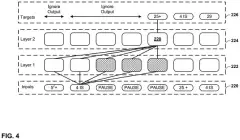
- Engagement: how often and how recently you chose similar actions, stored in a vector database (a store that files items by meaning).
- Embedding distance: a measure of how close two things are in meaning, used to tell a ketchup bottle from a whiskey bottle when both are labeled "bottle."
A second model can refine vague labels into precise text, so "banana" gets saved rather than "fruit," and labels like "nutrition" get dropped. Chosen actions can run on the phone or send the image to a third-party image search service.
The subject technology relates to processing visual content to generate and rank contextually relevant actions.
Translation: The system turns photos into helpful suggested actions.
Why Apple's photo suggestions could save you taps
In the filing's examples, the gap between taking a photo and getting something done shrinks to one tap. A milk carton could offer "add to grocery list," and a book cover could offer a lookup, without you hunting through apps. Because the list learns from your habits, it could even favor one shopping search service for shoes and another for furniture.
There is a trade-off. Ranking by your past behavior means the phone keeps a record of what you tap, and a visual search action can send the image and extra details to an outside provider. The abstract says actions may run locally or go to network services, and the filing leaves open how much stays on the device.
That makes this Apple's ninth filing we've tracked since July on our agents that act for you watchlist, joining earlier applications on waiting on hold for you and picking apps without being asked.
Source: US 2026/0369090 A1 at the USPTO (PDF). Full patent text and figures are in the official publication.
Get our take in your Top Stories
Liked this breakdown? Add Patentlyze as a preferred source on Google, and our plain-English take shows up more often in your Top Stories the next time Apple patent news breaks.
Add Patentlyze on Google
One click.
There are more where this came from
We read every patent application Big Tech publishes and send you the ones worth knowing. Plain English, free, every week.
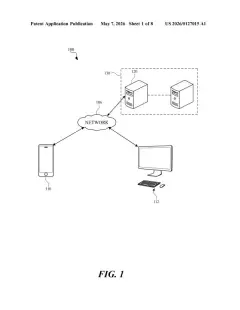
The drawings · 17 sheets
17 drawing sheets from US 2026/0369090 A1 · click any drawing to enlarge


Show the other 9 sheets


More from Apple
All 748 Apple patents →
More in AI image & video
All 226 AI image & video patents →
Samsung
Samsung Patents a Device That Turns Live Conversations Into AI-Generated Images
Adobe
Adobe Files Patent for an AI Judge That Grades Photos and Graphic Designs Differently
Microsoft
Microsoft Patents an AI Judge That Picks the Cleanest Photo Cutout
Qualcomm
No comments yet