
Apple
Apple · Software · Filed Dec 19, 2025 · USPTO published Nov 19, 2026 · This week's release
Apple Files Patent for Video Call Recording That Saves Both Sides' Own Footage
Apple's filing gives video calls a record button that appears only when you switch recording on. Afterward you get two copies of the call: one from your camera and one from the other person's.
- Publication number
- US 2026/0370504 A1(US20260370504A1)
- Applicant
- Apple Inc.
- Filed · Published
- Dec 19, 2025 · Nov 19, 2026
- Inventors
- Jae Woo CHANG, Jarrett A. FORD, Brandon A. LYNNE, Russell E. SNEDIKER
- Status when we published
- Waiting for an examiner
- Document
- 11 claims
- US classification
- 709/204
- Parent application
- Claims priority from a provisional application 63805101 (filed May 13, 2025)
What Apple's two-sided call recording does
You're on a video call with your sister while she walks you through your grandmother's soup recipe, and you want to keep it. Recording a call can take a lot of tapping, and what you save is the version that traveled over the internet to reach you.
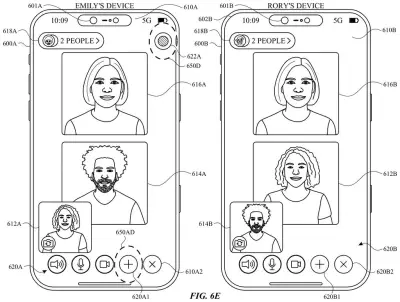
Apple's patent describes a record button inside the call, but it shows up only if you've turned on a recording setting. Tap it and the other person gets a prompt asking them to approve. Once they agree, your phone records you with its own camera and their device records them with theirs.
When the call ends, you keep your clip and get theirs too. The filing describes theirs as being sent to you automatically. The idea is that each recording is captured at its source, so it should look and sound better than a copy of the call stream.
The present disclosure generally relates to recording video of a real-time video communication session.
Translation: This patent covers ways to capture footage during live video chats.
How the record button and approval step work
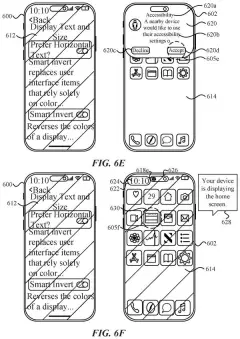
The claims describe a video calling screen that changes based on one switch. If a recording setting is on, the call screen shows a record element (a button). If the setting is off, the button is absent. Selecting it starts a recording process.
The dependent claims add several safeguards and conveniences:
- A notice that other participants must approve before recording starts, plus a prompt on their device.
- An alert that the session will be recorded.
- A stop button while recording, and a recording indicator if you leave the call screen mid-recording.
- A settings screen that shows where recordings are stored, but only when recording is enabled.
The core claim is what happens afterward. The system saves a first video recorded on your device with your camera, and a second video recorded on an external device, which the description explains is the other participant's. The description says the second clip can be sent to you automatically, with no extra steps. It also says capturing directly from each device's own camera and microphone improves quality over saving the video received through the call.
The description also covers a version where the record option sits in a menu of system controls outside the calling app, including one that starts recording automatically when your next call begins. The claims here focus on the in-call button.
saving a first video of the real-time video communication session that was recorded at the computer system using the one or more cameras; and saving a second video of the real-time video communication session that was recorded at an external device.
Translation: The system saves both your local camera footage and the other person's video feed separately.
Why your call recordings could look better
If you've ever tried to save a family call, a lesson, or an interview, the practical pitch is simple: one tap, a consent step, and two clean clips instead of one copy of the call. Because each clip comes from a device's own camera and microphone, you could end up with footage that looks and sounds better than a saved copy of what came through the call.
The approval step matters too. The other person is asked before anything is saved, so recording a call becomes a visible, agreed-upon act. The filing lists iPhone and iPad as example devices, so this would most plausibly show up in everyday phone and tablet calling. It's a patent application, not a product, so nothing here says when or whether you'd see it.
That makes this Apple's 689th filing in our Apple coverage since May, adding to a phone-focused run that includes the hold-waiting feature and AI training over cell towers.
Source: US 2026/0370504 A1 at the USPTO (PDF). Full patent text and figures are in the official publication.
Get our take in your Top Stories
Liked this breakdown? Add Patentlyze as a preferred source on Google, and our plain-English take shows up more often in your Top Stories the next time Apple patent news breaks.
Add Patentlyze on Google
One click.
There are more where this came from
We read every patent application Big Tech publishes and send you the ones worth knowing. Plain English, free, every week.
The drawings · 39 sheets
39 drawing sheets from US 2026/0370504 A1 · click any drawing to enlarge


Show the other 31 sheets


More from Apple
All 748 Apple patents →
More in Software
All 814 Software patents →
Google
Google Files Patent for Video Call Alerts That Show a Translation Is Still Playing
Sony
Sony Files Patent for Cheaper, Realistic Game Audio Behind Walls and Obstacles
Salesforce
Salesforce Files Patent for Drag-and-Drop Recommendations That Pull Live Data Without Copying It
Samsung
No comments yet