
Google
Google · Software · Filed Oct 16, 2025 · USPTO published Nov 19, 2026 · This week's release
Google Files Patent for One Screen That Lets Your Email Update Your Calendar
Reply to an email asking to move a meeting, and the meeting moves on your calendar too. That one-action handoff between apps is the heart of this Google filing.
- Publication number
- US 2026/0367756 A1(US20260367756A1)
- Applicant
- Google LLC
- Filed · Published
- Oct 16, 2025 · Nov 19, 2026
- Inventors
- Tim Wantland, Ryan Bryce Connolly, Christina Buquid, Jeffery Weber, Gus Winkelman
- Status when we published
- Waiting for an examiner
- Document
- 20 claims
- US classification
- 715/825
- Parent application
- National Stage Entry of PCT/US2023/078702 (filed Nov 3, 2023)(PCTUS2023078702)
What Google's linked-app panels actually do
Every time a colleague emails to push a meeting back, you do the same chore twice: reply in your email app, then hop over to your calendar and move the event by hand.
Google's patent application describes one screen built to cut out that second step. A strip of icons sits along one edge, one for each app. Tap an icon and a stripped-down version of that app opens in a panel, with just the few features you use most. You can have several panels open side by side.
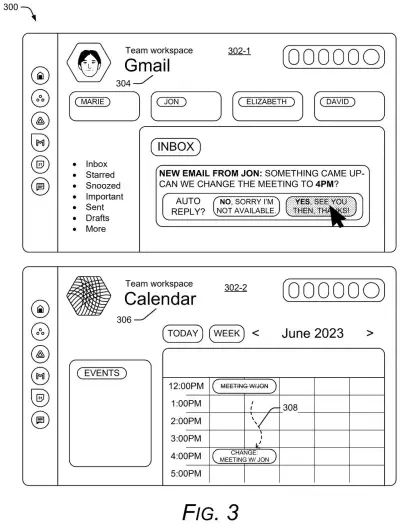
The twist is that the panels talk to each other. In the filing's example, you accept a colleague's request to move a meeting from 12:00 pm to 4:00 pm, and the calendar panel updates itself. One action, two apps changed. You can still jump into the full app whenever you want.
… altering second content of the second reduced-function-set version of the second software application, the alteration based on an interaction with the first content enabled through the first reduced-function-set version of the first software application.
Translation: Using one app's mini version automatically updates information inside another app's mini version.
How an email reply ends up in your calendar
The core claim covers a user interface application (a program that acts as one shared screen for other apps). It shows a row of selectable icons, one per app. Pick one and a reduced-function-set version opens in its own region of the screen, meaning a version with only a subset of the full app's features. Pick a second icon and a second panel opens.
Then comes the linking step. When you act on content in the first panel, the system changes content in the second app based on what you did. The filing describes three ways apps can be linked: you pair them with a task yourself, the system infers the link from how you arranged the panels, or a machine-learned model (software that finds patterns in your past behavior) guesses it. Information moves between apps through inter-process communication (the ways programs on one device pass data to each other, such as an API or a message queue).
The filing also describes some extras:
- Panels can be different sizes, and a bigger panel can offer more functions.
- Dragging an icon into the panel area adds an app and resizes the other panels automatically.
- Panels can take forms such as a thumbnail, a borderless window or a small applet.
- The same layout can also sort incoming notifications, with one example cutting sixteen alerts across four apps down to five.
… causing content changes made to one of the reduced-function-set versions to be reflected across another, different software application.
Translation: Making a change in one app instantly updates what you see in the other app.
What fewer app switches could mean for you
If you juggle email, texts, a calendar and notes for work, you know the tax: every task bounces you between apps that each look and behave differently. The filing's pitch is that one action could update several apps, so you stop copying the same information by hand. Its examples include striking a line from your meeting notes and having the team meeting app change to match, and a message that creates a calendar reminder.
The tradeoff is control. An app that edits other apps on its own, guided by a model trained on your habits, can also edit the wrong thing. The filing says it would depend on your explicit permission to use your data, but it does not spell out an undo button for a change you did not want.
That makes this Google's 1122nd filing we've tracked in our Google coverage since May, adding to work like captions moving to smart glasses and AI chat reading your screen.
Source: US 2026/0367756 A1 at the USPTO (PDF). Full patent text and figures are in the official publication.
Get our take in your Top Stories
Liked this breakdown? Add Patentlyze as a preferred source on Google, and our plain-English take shows up more often in your Top Stories the next time Google patent news breaks.
Add Patentlyze on Google
One click.
There are more where this came from
We read every patent application Big Tech publishes and send you the ones worth knowing. Plain English, free, every week.
The drawings · 29 sheets
29 drawing sheets from US 2026/0367756 A1 · click any drawing to enlarge


Show the other 21 sheets


More from Google
All 1,127 Google patents →
More in Software
All 814 Software patents →
Apple
Apple Patents Handwritten Notes That Rewrap Themselves Like Typed Text
Apple
Apple Patents a Virtual Bass That Decides Which Notes Cut Each Other Off
Samsung
Samsung Files Patent for a Screenshot That Offers to Add the Event to Your Calendar
Google
No comments yet