Get the newsletter
Samsung · Software · Filed Jun 30, 2026 · USPTO published Nov 19, 2026 · This week's release

Samsung Patents Phone Calls That Translate Both Sides and Let You Mute the Original Voice

Samsung's filing lets you silence the other person's real voice on a foreign-language call and hear only a translated voice. Or you can keep both and have the translation read out over the original.
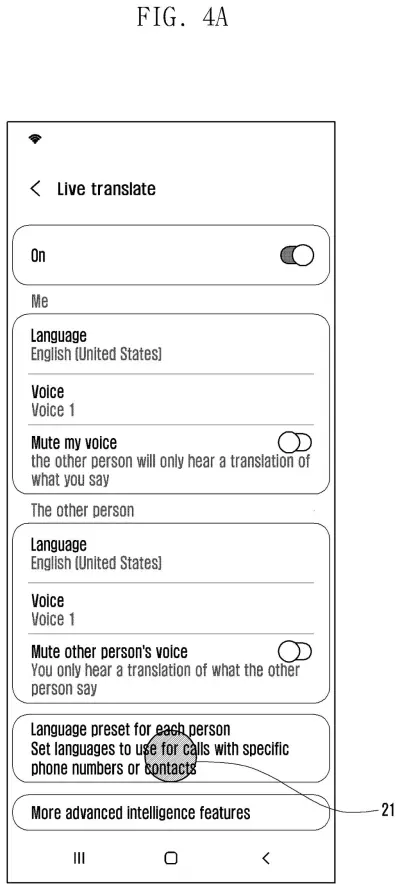
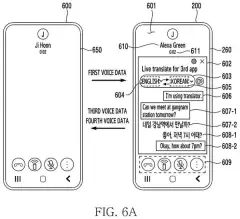
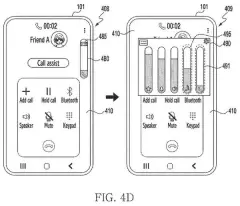
A phone screen lets callers turn on live translation and mute the other person's original voice during a conversation. Drawing from patent filing US 2026/0369264 A1.
A phone screen lets callers turn on live translation and mute the other person's original voice during a conversation.All 66 drawings ↓
Publication number
US 2026/0369264 A1(US20260369264A1)
Applicant
Samsung Electronics Co., Ltd.
Filed · Published
Jun 30, 2026 · Nov 19, 2026
Inventors
Yanghee KWON, Jaegi HAN, Sungwon PARK, Seowon CHOI, Hyunkyoung KIM, Wanje PARK, Dongil SON
Status when we published
Waiting for an examiner
Document
20 claims
US classification
704/200
Parent application
Continuation of PCT/KR2024/021030 (filed Dec 24, 2024)(PCTKR2024021030)

What Samsung's call interpreter actually does

You're on a call with a shop owner in Quebec, and you don't speak a word of French. Your screen shows what they say as French text, your language sits right beside it, and a synthetic voice reads the translation aloud.

Samsung's patent adds a twist: two mute switches. Turn one on and the other person's real voice disappears from your speaker, so you hear only the translated voice. Leave it off and you hear their voice first, then the translation, played louder so it stands out. The same choices work in reverse for what the other person hears of you.

The filing also describes guessing their language from the area code of their phone number, or from a text they sent you earlier, and downloading a missing language pack in the middle of the call.

From the filing · CLAIM 1
convert an utterance of a counterpart in a first language into first text, and display the first text on a script screen on the display during a call …

Translation: It turns the other person's spoken words into written text displayed on your screen during the call.

How the two mute switches shape what you hear

The claims cover a phone that listens to the other person, turns their speech into written text (speech-to-text), and shows it on a "script screen" during the call. It then translates that text into your language, shows both versions together, and converts the translation into a synthetic voice (text-to-speech, or TTS).

The key claim is the mute option for the other person's voice:

  • Mute on: the phone identifies their voice but doesn't play it, and you hear only the TTS translation.
  • Mute off: you hear their original voice and the TTS translation. The description gives example volumes of 3 for the original and 10 for the translation.

A second set of claims mirrors this for your own voice. A mute option decides whether the other person's phone gets your real voice plus the translation, or the translation alone.

The description adds more detail. You can switch off translation for either side if you speak the other language. You can change the other person's language mid-call, and the phone downloads the language pack if it's missing. Words can light up on screen as they're spoken, and old text is deleted when the screen fills. Both phones can run the feature at once, and a server keeps the two transcripts in sync, even when one person edits a mistranslated line. Conference calls get one translation per participant language.

From the filing · THE ABSTRACT
… in case that a first mute option for the utterance of the counterpart is enabled, identify the utterance of the counterpart, and output the first TTS audio signal through the speaker without outputting the utterance of the counterpart …

Translation: If you turn on the mute option, you hear only the translated voice and not the original speaker.

Why live call translation could reach phones fast

The practical gain is that a phone call with someone who shares no language with you could work without a human interpreter on the line. The mute switch is a small control with a real effect: some people want to hear the original voice's tone and emotion, while others find two voices talking at once confusing.

The filing's call screens show a "live translate" button in the call menu, so the feature is described as something you turn on mid-call. It also covers incoming calls, unsaved numbers and group calls. That makes it a feature built for everyday use rather than a lab demo.

This is the 1649th Samsung filing in our Samsung coverage since May, adding to work like the watch voice fix and the AI model tracker.

Source: US 2026/0369264 A1 at the USPTO (PDF). Full patent text and figures are in the official publication.

Get our take in your Top Stories

Liked this breakdown? Add Patentlyze as a preferred source on Google, and our plain-English take shows up more often in your Top Stories the next time Samsung patent news breaks.

There are more where this came from

We read every patent application Big Tech publishes and send you the ones worth knowing. Plain English, free, every week.

The drawings · 66 sheets

66 drawing sheets from US 2026/0369264 A1 · click any drawing to enlarge

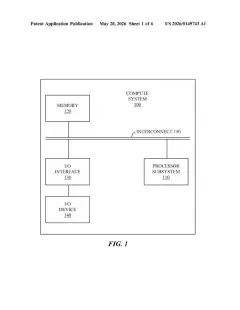
Internal parts of a phone connected to network devices, drawing sheet 1 from US 2026/0369264 A1
Sheet 1 Internal parts of a phone connected to network devices
Hardware components that process and play spoken audio, drawing sheet 2 from US 2026/0369264 A1
Sheet 2 Hardware components that process and play spoken audio
Turning on live call translation in device settings, drawing sheet 3 from US 2026/0369264 A1
Sheet 3 Turning on live call translation in device settings
Picking a spoken language for the other caller, drawing sheet 4 from US 2026/0369264 A1
Sheet 4 Picking a spoken language for the other caller
Confirming the chosen language selection, drawing sheet 5 from US 2026/0369264 A1
Sheet 5 Confirming the chosen language selection
Prompt to download necessary language voice packs, drawing sheet 6 from US 2026/0369264 A1
Sheet 6 Prompt to download necessary language voice packs
Changing the user language setting after installation, drawing sheet 7 from US 2026/0369264 A1
Sheet 7 Changing the user language setting after installation
Downloading additional foreign language files from a list, drawing sheet 8 from US 2026/0369264 A1
Sheet 8 Downloading additional foreign language files from a list
Show the other 52 sheets
Choosing your default speaking language from downloaded packs, drawing sheet 9 from US 2026/0369264 A1
Sheet 9 Choosing your default speaking language from downloaded packs
Switching the other caller's language mid-call, drawing sheet 10 from US 2026/0369264 A1
Sheet 10 Switching the other caller's language mid-call
Live translation settings for muting either caller's voice, drawing sheet 11 from US 2026/0369264 A1
Sheet 11 Live translation settings for muting either caller's voice
Saving default translation languages for specific contacts, drawing sheet 12 from US 2026/0369264 A1
Sheet 12 Saving default translation languages for specific contacts
Picking a contact to assign a preset language, drawing sheet 13 from US 2026/0369264 A1
Sheet 13 Picking a contact to assign a preset language
Entering a phone number to assign a translation language, drawing sheet 14 from US 2026/0369264 A1
Sheet 14 Entering a phone number to assign a translation language
Selecting which language the other person speaks, drawing sheet 15 from US 2026/0369264 A1
Sheet 15 Selecting which language the other person speaks
Downloading a new language pack for a contact preset, drawing sheet 16 from US 2026/0369264 A1
Sheet 16 Downloading a new language pack for a contact preset
Picking the spoken language for the other caller, drawing sheet 17 from US 2026/0369264 A1
Sheet 17 Picking the spoken language for the other caller
Customizing synthetic voices and languages for both callers, drawing sheet 18 from US 2026/0369264 A1
Sheet 18 Customizing synthetic voices and languages for both callers
Picking which phone number to link with a preset language, drawing sheet 19 from US 2026/0369264 A1
Sheet 19 Picking which phone number to link with a preset language
Saved language profiles assigned to individual contacts, drawing sheet 20 from US 2026/0369264 A1
Sheet 20 Saved language profiles assigned to individual contacts
Deciding whether to use saved or default translation settings, drawing sheet 21 from US 2026/0369264 A1
Sheet 21 Deciding whether to use saved or default translation settings
How speech converts to text and synthesized audio across callers, drawing sheet 22 from US 2026/0369264 A1
Sheet 22 How speech converts to text and synthesized audio across callers
Tapping the call assist button during an incoming call, drawing sheet 23 from US 2026/0369264 A1
Sheet 23 Tapping the call assist button during an incoming call
Activating live translation before answering an incoming call, drawing sheet 24 from US 2026/0369264 A1
Sheet 24 Activating live translation before answering an incoming call
Tapping the banner stops live translation mid call, drawing sheet 25 from US 2026/0369264 A1
Sheet 25 Tapping the banner stops live translation mid call
Swiping back brings up the live translation transcript, drawing sheet 26 from US 2026/0369264 A1
Sheet 26 Swiping back brings up the live translation transcript
Choosing Call assist on an incoming call, drawing sheet 27 from US 2026/0369264 A1
Sheet 27 Choosing Call assist on an incoming call
Selecting Live translate from the call assist menu, drawing sheet 28 from US 2026/0369264 A1
Sheet 28 Selecting Live translate from the call assist menu
Changing spoken languages directly from the translation screen, drawing sheet 29 from US 2026/0369264 A1
Sheet 29 Changing spoken languages directly from the translation screen
Downloading a new language pack during a call, drawing sheet 30 from US 2026/0369264 A1
Sheet 30 Downloading a new language pack during a call
Installed language packs ready for instant use, drawing sheet 31 from US 2026/0369264 A1
Sheet 31 Installed language packs ready for instant use
Switching the other caller's language from a pop-up menu, drawing sheet 32 from US 2026/0369264 A1
Sheet 32 Switching the other caller's language from a pop-up menu
Settings to mute either speaker's original voice during calls, drawing sheet 33 from US 2026/0369264 A1
Sheet 33 Settings to mute either speaker's original voice during calls
A typing indicator showing the other caller has started speaking, drawing sheet 34 from US 2026/0369264 A1
Sheet 34 A typing indicator showing the other caller has started speaking
Incoming speech appearing as words while translation gets underway, drawing sheet 35 from US 2026/0369264 A1
Sheet 35 Incoming speech appearing as words while translation gets underway
Live translation appearing directly below the caller's spoken words, drawing sheet 36 from US 2026/0369264 A1
Sheet 36 Live translation appearing directly below the caller's spoken words
Finished translations shown in full on the call screen, drawing sheet 37 from US 2026/0369264 A1
Sheet 37 Finished translations shown in full on the call screen
Translated call log showing both speakers as dialogue unfolds, drawing sheet 38 from US 2026/0369264 A1
Sheet 38 Translated call log showing both speakers as dialogue unfolds
Scrolling conversation history tracking both sides of the call, drawing sheet 39 from US 2026/0369264 A1
Sheet 39 Scrolling conversation history tracking both sides of the call
Checking whether the other caller's phone supports live translation, drawing sheet 40 from US 2026/0369264 A1
Sheet 40 Checking whether the other caller's phone supports live translation
Detecting a caller's regional language from their phone number, drawing sheet 41 from US 2026/0369264 A1
Sheet 41 Detecting a caller's regional language from their phone number
Automatically matching call translation to the detected area code, drawing sheet 42 from US 2026/0369264 A1
Sheet 42 Automatically matching call translation to the detected area code
Answering an incoming call from an unsaved number, drawing sheet 43 from US 2026/0369264 A1
Sheet 43 Answering an incoming call from an unsaved number
Checking recent text messages to identify the caller's language, drawing sheet 44 from US 2026/0369264 A1
Sheet 44 Checking recent text messages to identify the caller's language
Starting a call translated using clues from earlier messages, drawing sheet 45 from US 2026/0369264 A1
Sheet 45 Starting a call translated using clues from earlier messages
Tapping the translation button during an active phone call, drawing sheet 46 from US 2026/0369264 A1
Sheet 46 Tapping the translation button during an active phone call
Alerting you that the other caller turned on translation, drawing sheet 47 from US 2026/0369264 A1
Sheet 47 Alerting you that the other caller turned on translation
Notifying you of live translation while keeping standard call controls, drawing sheet 48 from US 2026/0369264 A1
Sheet 48 Notifying you of live translation while keeping standard call controls
Transcribing spoken words on screen before translating them, drawing sheet 49 from US 2026/0369264 A1
Sheet 49 Transcribing spoken words on screen before translating them
Showing text translation directly beneath the caller's spoken words, drawing sheet 50 from US 2026/0369264 A1
Sheet 50 Showing text translation directly beneath the caller's spoken words
Prompting the other caller to enable live translation, drawing sheet 51 from US 2026/0369264 A1
Sheet 51 Prompting the other caller to enable live translation
Displaying real-time translated text on the other caller's phone, drawing sheet 52 from US 2026/0369264 A1
Sheet 52 Displaying real-time translated text on the other caller's phone
Settings to mute your voice and adjust read-aloud translation volume, drawing sheet 53 from US 2026/0369264 A1
Sheet 53 Settings to mute your voice and adjust read-aloud translation volume
Matching spoken voice levels to synthetic speech volume, drawing sheet 54 from US 2026/0369264 A1
Sheet 54 Matching spoken voice levels to synthetic speech volume
Deciding whether both phones will share live translation tasks, drawing sheet 55 from US 2026/0369264 A1
Sheet 55 Deciding whether both phones will share live translation tasks
Correcting call transcript errors and syncing them between phones, drawing sheet 56 from US 2026/0369264 A1
Sheet 56 Correcting call transcript errors and syncing them between phones
How phones and a server split translation duties, drawing sheet 57 from US 2026/0369264 A1
Sheet 57 How phones and a server split translation duties
Selecting mistranslated text in a live call transcript, drawing sheet 58 from US 2026/0369264 A1
Sheet 58 Selecting mistranslated text in a live call transcript
Typing in the correct wording to replace a mistaken translation, drawing sheet 59 from US 2026/0369264 A1
Sheet 59 Typing in the correct wording to replace a mistaken translation
Edited text appearing on both callers screens, drawing sheet 60 from US 2026/0369264 A1
Sheet 60 Edited text appearing on both callers screens

Sheets 61 to 66 are in the full USPTO filing.

Patent filing page

Reader comments

No comments yet

Start the discussion

Real name or a handle, either is fine. Comments are read by a person before they appear, so allow a little time. Keep it about the filing.