
Apple
Apple · Software · Filed Jul 22, 2026 · USPTO published Nov 19, 2026 · This week's release
Apple Files Patent for a Video Timeline That Flags Scenes Risky to Your Health
Your video progress bar could warn you about the scenes most likely to hurt you. Apple's filing colors each stretch of a movie by health risk, such as strobing lights for viewers with epilepsy.
- Publication number
- US 2026/0370912 A1(US20260370912A1)
- Applicant
- Apple Inc.
- Filed · Published
- Jul 22, 2026 · Nov 19, 2026
- Inventors
- Gregory S. ROBBIN, Daniel E. MARUSICH, Eliza J. VON HAGEN, Emily A. STONE
- Status when we published
- Waiting for an examiner
- Document
- 19 claims
- US classification
- 725/37
- Parent application
- Continuation of 18/329,211 (filed Jun 5, 2023)(18329211)
What Apple's health-flagged video timeline does
You're settling in to watch a movie, and you have a condition that makes flashing lights risky. Somewhere in the second half there's a strobe-heavy scene, and nothing on screen tells you when it's coming.
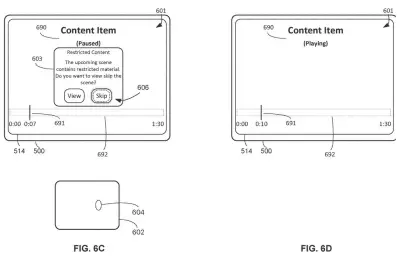
Apple's filing describes a fix built into the progress bar you drag along the bottom of a video. Parts of the movie that could be a problem show up in a different color, and a stronger shade means a higher risk. The warning labels can come from the studio or streaming service, and your device can compare them against health details saved in your profile.
The filing also describes what happens when you reach one of those scenes: a prompt to skip it, a short description of what you'd miss, or an automatic jump past it.
… displaying a first respective portion of the interactive timeline corresponding to the first portion of the media content with a respective visual characteristic having a first value; and in accordance with a determination that the first health-based metadata does not satisfy the one or more criteria …
Translation: The timeline changes how it looks for risky scenes compared to normal parts.
How the timeline shades scenes by risk level
Claim 1 covers a video player that shows a movie or show next to its interactive timeline (the progress bar, or scrubber, you drag to jump around). Parts of the video carry health-based metadata, meaning labels that describe a possible risk in that stretch. If a part meets the risk test, its slice of the timeline is drawn one way. If not, it is drawn another way.
The dependent claims fill in the details:
- The slice can change color, and a different risk level can change the color's saturation (how vivid it is).
- The labels can come from the company providing the video, and the risk level can also depend on health data in the active user's profile.
- Risk can also depend on your screen's brightness setting, the size of the picture, or the playback speed.
When playback reaches a flagged part, the device can start a process to change what you see. The claims list changing the color space (the range of colors shown), hiding the picture while the audio keeps playing, scaling the video, combining frames, or lowering brightness.
The description gives examples such as a scene with lights flashing faster than 30 times per second, tagged as 90% risk for epilepsy, and also mentions tags for trauma-related or violent content. It says tags might be added by the provider or by a machine learning model, and that the device could skip a scene automatically or show a short description of what you skipped.
… configured to initiate processes to forgo display of sensitive content and/or display an interactive timeline indicating such sensitive content based on the health-based metadata.
Translation: The device can hide triggering scenes or mark them on the timeline using health data.
Why this matters for viewers with epilepsy
If you or someone in your house has photosensitive epilepsy, a trauma history, or a strong dislike of certain scenes, a warning you can see on the timeline beats a vague content rating on the box. You would know where the flagged scene starts and ends, how serious the label says it is, and you could skip it or watch with the picture dimmed.
The filing is a continuation of an application first filed in 2023, and it describes set-top boxes, phones, tablets and even car infotainment screens. Nothing here says a product is coming, and the system depends on someone, whether a studio, a streaming service or an AI tool, labeling scenes in the first place. The privacy question is also open, since the design matches those labels against health details in your profile.
This is the 681st Apple filing we've tracked in our Apple coverage since May, adding to a run that includes a face-lighting screen idea and a sound-follows-camera broadcast patent.
Source: US 2026/0370912 A1 at the USPTO (PDF). Full patent text and figures are in the official publication.
Get our take in your Top Stories
Liked this breakdown? Add Patentlyze as a preferred source on Google, and our plain-English take shows up more often in your Top Stories the next time Apple patent news breaks.
Add Patentlyze on Google
One click.
There are more where this came from
We read every patent application Big Tech publishes and send you the ones worth knowing. Plain English, free, every week.
The drawings · 27 sheets
27 drawing sheets from US 2026/0370912 A1 · click any drawing to enlarge


Show the other 19 sheets


More from Apple
All 748 Apple patents →
More in Software
All 814 Software patents →
Samsung
Samsung Patents an Auto-Schema Health Data Analysis System
Google
Google Patents a Dual-Timeline Scrubbing Interface for Security Camera Footage
Google
Google Patents a Video Call That Sharpens Only What You're Looking At
Google
No comments yet