Get the newsletter
Apple · Software · Filed Mar 16, 2026 · USPTO published Nov 19, 2026 · This week's release

Apple Patents a Screen Glow That Lights Your Face on Dim Video Calls

When you join a video call in a dark room, your screen could glow around the edges to light your face, according to a new Apple patent application.
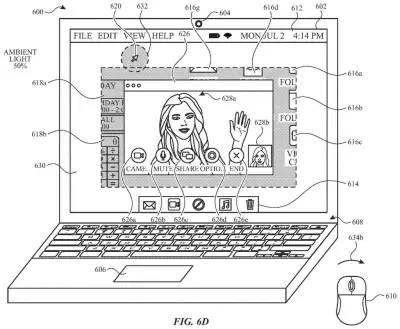
A laptop automatically expands a bright white border around a video call to light up the caller when the room gets dark. Drawing from patent filing US 2026/0370957 A1.
A laptop automatically expands a bright white border around a video call to light up the caller when the room gets dark.All 34 drawings ↓
Publication number
US 2026/0370957 A1(US20260370957A1)
Applicant
Apple Inc.
Filed · Published
Mar 16, 2026 · Nov 19, 2026
Inventors
Marisa R. LU, Chun Kin Minor WONG, I-Cheng A. LEE, Gilad MICHAEL
Status when we published
Waiting for an examiner
Document
25 claims
US classification
715/771
Parent application
Claims priority from a provisional application 63807496 (filed May 16, 2025)

What Apple's virtual ring light actually does

Every time you take a video call in a dim room, your face turns into a murky blob while the person on the other end squints. A ring light, the glowing circle you see on streamers' desks, fixes that, but most of us don't own one.

Apple's patent application describes a virtual ring light built into the screen. When an app asks to turn on the camera, your computer checks a few conditions, such as whether the room is dark enough. If it is, a bright band of light appears around your call window, so the screen itself shines on your face. If the room is already bright, nothing changes.

You would also get controls to dim the ring, resize it, or drag it somewhere else. It is only a patent application for now, so whether it becomes a real feature is an open question.

From the filing · CLAIM 1
… initiating a process for displaying, via the one or more display generation components, a virtual ring light along with initiating a process for using the first camera for the first function …

Translation: Turning on the screen glow at the same time the camera starts.

How Apple's ring light decides when to switch on

The filing covers a system, a method and stored software instructions that all do the same basic thing. The computer notices a request to use the camera (the description's main example is accepting a video call). It then checks a set of conditions. If they are met, it shows the ring light and starts the camera. If not, it starts the camera with no ring.

The conditions the claims describe include:

  • Automatic mode: the ring only appears if you have switched on an auto setting for it.
  • Dark room: light sensors must read the room as dimmer than a cutoff, and that cutoff can depend on how well the camera copes with low light.

Once it is showing, the ring fades in from the edges of the screen and can sit around your call windows. Its look can change with the lighting, including where your face is and how far it sits from the screen. A bigger ring means more light, so the system can change brightness by changing size. The ring can also use a brighter range (high-dynamic-range, or HDR, brightness) than other content on screen.

Windows can sit on top of the ring, and the ring can sit on top of windows. When your cursor or gaze moves into the ring, it clears a patch around that spot so you can see what is underneath, then fills back in as you move on. You can also drag it elsewhere and use on-screen lighting controls next to the camera controls.

What this means for laptop video calls

If you take calls from a bedroom, a hotel room or a kitchen table at night, the practical win is simple: better-lit video without buying a clip-on light or turning on a harsh lamp. The ring would switch itself on only when the room needs it, so you would not have to think about it.

The filing uses a laptop as its main example and also lists iPhone and iPad as possible devices. It describes the ring staying out of your way, letting you click through it to windows underneath and move it around. Anyone who has stared at a dark, grainy self-view on a call will see the appeal.

That makes this Apple's 680th filing we've tracked in our Apple coverage since May, a set that includes a live event audio patent and a store location via Wi-Fi patent.

Source: US 2026/0370957 A1 at the USPTO (PDF). Full patent text and figures are in the official publication.

Get our take in your Top Stories

Liked this breakdown? Add Patentlyze as a preferred source on Google, and our plain-English take shows up more often in your Top Stories the next time Apple patent news breaks.

There are more where this came from

We read every patent application Big Tech publishes and send you the ones worth knowing. Plain English, free, every week.

The drawings · 34 sheets

34 drawing sheets from US 2026/0370957 A1 · click any drawing to enlarge

Hardware parts that run the phone and cameras, drawing sheet 1 from US 2026/0370957 A1
Sheet 1 Hardware parts that run the phone and cameras
Software that tracks touches on the display, drawing sheet 2 from US 2026/0370957 A1
Sheet 2 Software that tracks touches on the display
Sensor placement on a handheld touch screen device, drawing sheet 3 from US 2026/0370957 A1
Sheet 3 Sensor placement on a handheld touch screen device
Internal parts for a computer with separate controls, drawing sheet 4 from US 2026/0370957 A1
Sheet 4 Internal parts for a computer with separate controls
Two ways software requests and uses system data, drawing sheet 5 from US 2026/0370957 A1
Sheet 5 Two ways software requests and uses system data
Programs organized to exchange tasks and data, drawing sheet 6 from US 2026/0370957 A1
Sheet 6 Programs organized to exchange tasks and data
Messages passing back and forth between programs, drawing sheet 7 from US 2026/0370957 A1
Sheet 7 Messages passing back and forth between programs
A home screen displaying common mobile apps, drawing sheet 8 from US 2026/0370957 A1
Sheet 8 A home screen displaying common mobile apps
Show the other 26 sheets
Moving fingers on a trackpad to control on-screen items, drawing sheet 9 from US 2026/0370957 A1
Sheet 9 Moving fingers on a trackpad to control on-screen items
A touch screen device with physical buttons, drawing sheet 10 from US 2026/0370957 A1
Sheet 10 A touch screen device with physical buttons
Internal parts and sensors that run a smart device, drawing sheet 11 from US 2026/0370957 A1
Sheet 11 Internal parts and sensors that run a smart device
Three people sharing video feeds in a live group call, drawing sheet 12 from US 2026/0370957 A1
Sheet 12 Three people sharing video feeds in a live group call
Answering an incoming video call on a laptop screen, drawing sheet 13 from US 2026/0370957 A1
Sheet 13 Answering an incoming video call on a laptop screen
A standard video call interface under normal room lighting, drawing sheet 14 from US 2026/0370957 A1
Sheet 14 A standard video call interface under normal room lighting
Screen edges brightening into a ring light in dim rooms, drawing sheet 15 from US 2026/0370957 A1
Sheet 15 Screen edges brightening into a ring light in dim rooms
Expanding the virtual light border as the room gets darker, drawing sheet 16 from US 2026/0370957 A1
Sheet 16 Expanding the virtual light border as the room gets darker
Moving a pointer across the display to reveal hidden controls, drawing sheet 17 from US 2026/0370957 A1
Sheet 17 Moving a pointer across the display to reveal hidden controls
Hovering over the screen to preview lighting settings, drawing sheet 18 from US 2026/0370957 A1
Sheet 18 Hovering over the screen to preview lighting settings
Selecting camera controls within a video call window, drawing sheet 19 from US 2026/0370957 A1
Sheet 19 Selecting camera controls within a video call window
Changing room lighting prompts the call window to resize, drawing sheet 20 from US 2026/0370957 A1
Sheet 20 Changing room lighting prompts the call window to resize
Placing the pointer near the camera to trigger face lighting, drawing sheet 21 from US 2026/0370957 A1
Sheet 21 Placing the pointer near the camera to trigger face lighting
Shifting the glow target above the video chat, drawing sheet 22 from US 2026/0370957 A1
Sheet 22 Shifting the glow target above the video chat
Bringing up an email notification during a video call, drawing sheet 23 from US 2026/0370957 A1
Sheet 23 Bringing up an email notification during a video call
Clicking the call settings to adjust on-screen illumination, drawing sheet 24 from US 2026/0370957 A1
Sheet 24 Clicking the call settings to adjust on-screen illumination
Adjusting virtual ring light brightness and warmth using menu sliders, drawing sheet 25 from US 2026/0370957 A1
Sheet 25 Adjusting virtual ring light brightness and warmth using menu sliders
Turning off the glow returns your desktop to full brightness, drawing sheet 26 from US 2026/0370957 A1
Sheet 26 Turning off the glow returns your desktop to full brightness
Dimming the desktop while illuminating a frame around your screen, drawing sheet 27 from US 2026/0370957 A1
Sheet 27 Dimming the desktop while illuminating a frame around your screen
Brightening the screen border to illuminate the caller, drawing sheet 28 from US 2026/0370957 A1
Sheet 28 Brightening the screen border to illuminate the caller
Warming the screen glow for natural skin tones, drawing sheet 29 from US 2026/0370957 A1
Sheet 29 Warming the screen glow for natural skin tones
Choosing different colors and shapes for the onscreen light border, drawing sheet 30 from US 2026/0370957 A1
Sheet 30 Choosing different colors and shapes for the onscreen light border
Shifting the light band to one side, drawing sheet 31 from US 2026/0370957 A1
Sheet 31 Shifting the light band to one side
Placing a light bar along one window edge, drawing sheet 32 from US 2026/0370957 A1
Sheet 32 Placing a light bar along one window edge
Adjusting virtual light colors and shapes on a laptop screen, drawing sheet 33 from US 2026/0370957 A1
Sheet 33 Adjusting virtual light colors and shapes on a laptop screen
How the laptop decides whether to illuminate your face, drawing sheet 34 from US 2026/0370957 A1
Sheet 34 How the laptop decides whether to illuminate your face
Patent filing page

Reader comments

No comments yet

Start the discussion

Real name or a handle, either is fine. Comments are read by a person before they appear, so allow a little time. Keep it about the filing.