Get the newsletter
Apple · Software · Filed Jul 23, 2026 · USPTO published Nov 19, 2026 · This week's release

Apple Patents a Video Call Layout That Puts You in Front of What You Share

On a video call, your face usually sits in a small box next to whatever you're sharing. Apple's filing describes a layout that puts you in front of it instead, down to a shadow on the content and hands that fade when they drop below your head.
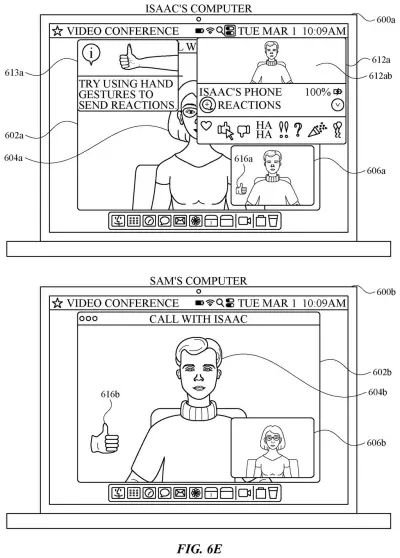
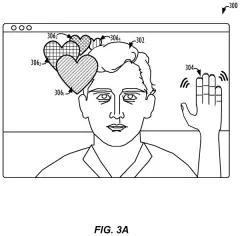
A laptop running a video call suggests using hand gestures to trigger on-screen reaction icons. Drawing from patent filing US 2026/0367713 A1.
A laptop running a video call suggests using hand gestures to trigger on-screen reaction icons.All 113 drawings ↓
Publication number
US 2026/0367713 A1(US20260367713A1)
Applicant
Apple Inc.
Filed · Published
Jul 23, 2026 · Nov 19, 2026
Inventors
Nicolas V. SCAPEL, Johnnie B. MANZARI, Giancarlo YERKES, Adrian ZUMBRUNNEN
Status when we published
Waiting for an examiner
Document
37 claims
US classification
348/14.09
Parent application
Continuation of 18/416,784 (filed Jan 18, 2024)(18416784)

What Apple's cutout-over-content call view does

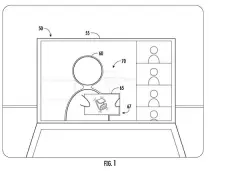
Imagine you're on a video call walking your team through a chart. Right now, you're probably a small face in one corner while the chart fills the screen. This Apple patent application describes a layout where you appear to stand in front of the chart, a bit like a TV weather forecaster.

Here's how it works from your side. You ask to share something, and the call builds a single combined picture: the content in back, with a cutout of you (live video or an avatar) layered on top. You can drag yourself to another spot, switch layouts, or add a second person to the same scene.

The filing says the goal is fewer taps and key presses for effects like this. It also describes small touches, like a soft shadow of you falling across the content, so the result looks like one scene.

From the filing · CLAIM 1
… displaying, via the display generation component, a user interface element in the user interface of the real-time communication session, wherein the user interface element is a composite of the content associated with the first participant in the real-time communication session and a representation of the first participant …

Translation: The system shows your video feed combined directly into whatever content you are sharing.

How the call layers you over shared content

The claims cover a call-screen feature. While a real-time video call is running, you send a request to share content that goes with you. The software responds by showing one on-screen element that is a composite (a single combined image) of that content and a representation of you. That representation can be your live video or an avatar.

The later claims describe how the layering works:

  • Your image can be segmented, meaning cut out from your real background, and placed over a simulated background.
  • You can sit in front of the content or partly cover it, and a shadow of you can fall on it.
  • A mask can fade parts of you: hands above your head show more clearly than hands below it.
  • A participant tracking mode decides whether the content stays put when you move or shifts relative to you.

You can also move yourself or the content to another spot, trigger an animation where the content grows and you shrink, or add a second person to the composite. The composite can reach the call app as a single video feed, so the app receives it as one video stream.

The description also covers related ideas: hand-gesture effects that appear where the gesture happens, and a framing mode that holds the shot when you move.

From the filing · THE ABSTRACT
… methods and user interfaces for displaying graphical effects during a real-time communication session are described. In some embodiments, methods and user interfaces for sharing content during a real-time communication session are described.

Translation: The document outlines various techniques for blending visuals and sharing media during video calls.

Why Apple's presenter-style video calls matter

If you give presentations over video, this targets a familiar annoyance: you and your material compete for space on the screen. Putting you in front of the content gives your audience one scene to look at, and you can reposition yourself or the content as you talk.

The filing lists devices like the iPhone and iPad, and frames the work as saving taps and battery. It's a patent application, so nothing here says when, or whether, this ships. The avatar option stands out, because it means the same layout could work for people who would rather not show their face.

This is the 742nd Apple patent application in our Apple coverage since May, adding to a run that includes a fingertip headset controller and reactive Messages backgrounds.

Source: US 2026/0367713 A1 at the USPTO (PDF). Full patent text and figures are in the official publication.

Get our take in your Top Stories

Liked this breakdown? Add Patentlyze as a preferred source on Google, and our plain-English take shows up more often in your Top Stories the next time Apple patent news breaks.

There are more where this came from

We read every patent application Big Tech publishes and send you the ones worth knowing. Plain English, free, every week.

The drawings · 113 sheets

113 drawing sheets from US 2026/0367713 A1 · click any drawing to enlarge

Hardware parts and software built into a smartphone, drawing sheet 1 from US 2026/0367713 A1
Sheet 1 Hardware parts and software built into a smartphone
How the system routes user inputs to apps, drawing sheet 2 from US 2026/0367713 A1
Sheet 2 How the system routes user inputs to apps
External sensors and physical controls on a phone, drawing sheet 3 from US 2026/0367713 A1
Sheet 3 External sensors and physical controls on a phone
Computer components that support touchscreen and mouse controls, drawing sheet 4 from US 2026/0367713 A1
Sheet 4 Computer components that support touchscreen and mouse controls
An app home screen showing communication shortcuts, drawing sheet 5 from US 2026/0367713 A1
Sheet 5 An app home screen showing communication shortcuts
Controlling an external screen using a touch pad, drawing sheet 6 from US 2026/0367713 A1
Sheet 6 Controlling an external screen using a touch pad
Front view of a smartwatch design, drawing sheet 7 from US 2026/0367713 A1
Sheet 7 Front view of a smartwatch design
Internal motion sensors and processors inside a watch, drawing sheet 8 from US 2026/0367713 A1
Sheet 8 Internal motion sensors and processors inside a watch
Show the other 52 sheets
Connecting multiple callers across separate screens, drawing sheet 9 from US 2026/0367713 A1
Sheet 9 Connecting multiple callers across separate screens
Standard two-way video call layout before triggers, drawing sheet 10 from US 2026/0367713 A1
Sheet 10 Standard two-way video call layout before triggers
Waving your hand to start a reaction, drawing sheet 11 from US 2026/0367713 A1
Sheet 11 Waving your hand to start a reaction
Giving a thumbs-up prompts to turn on reactions, drawing sheet 12 from US 2026/0367713 A1
Sheet 12 Giving a thumbs-up prompts to turn on reactions
Selecting an emoji response from a pop-up menu, drawing sheet 13 from US 2026/0367713 A1
Sheet 13 Selecting an emoji response from a pop-up menu
Sending a thumbs-up graphic directly to the call, drawing sheet 14 from US 2026/0367713 A1
Sheet 14 Sending a thumbs-up graphic directly to the call
Moving a hand sideways across the camera view, drawing sheet 15 from US 2026/0367713 A1
Sheet 15 Moving a hand sideways across the camera view
Animated reaction icons floating upward on screen, drawing sheet 16 from US 2026/0367713 A1
Sheet 16 Animated reaction icons floating upward on screen
Thumbs up triggers rising bubbles on both screens, drawing sheet 17 from US 2026/0367713 A1
Sheet 17 Thumbs up triggers rising bubbles on both screens
Floating reactions rise higher as the gesture continues, drawing sheet 18 from US 2026/0367713 A1
Sheet 18 Floating reactions rise higher as the gesture continues
Floating bubble effects fade away as the gesture ends, drawing sheet 19 from US 2026/0367713 A1
Sheet 19 Floating bubble effects fade away as the gesture ends
A prompt offers to turn off gesture reactions, drawing sheet 20 from US 2026/0367713 A1
Sheet 20 A prompt offers to turn off gesture reactions
Holding a gesture without effects after turning reactions off, drawing sheet 21 from US 2026/0367713 A1
Sheet 21 Holding a gesture without effects after turning reactions off
Two thumbs up trigger bubbles from both hands, drawing sheet 22 from US 2026/0367713 A1
Sheet 22 Two thumbs up trigger bubbles from both hands
Double thumbs up creates a celebratory fireworks effect, drawing sheet 23 from US 2026/0367713 A1
Sheet 23 Double thumbs up creates a celebratory fireworks effect
Two thumbs down fill the screen with rain animation, drawing sheet 24 from US 2026/0367713 A1
Sheet 24 Two thumbs down fill the screen with rain animation
Two peace signs fill the caller background with confetti, drawing sheet 25 from US 2026/0367713 A1
Sheet 25 Two peace signs fill the caller background with confetti
Confetti slowly fades as the caller drops their hands, drawing sheet 26 from US 2026/0367713 A1
Sheet 26 Confetti slowly fades as the caller drops their hands
Framing fingers around the eyes snaps a call photo, drawing sheet 27 from US 2026/0367713 A1
Sheet 27 Framing fingers around the eyes snaps a call photo
A thumbs up while facing the camera is recognized, drawing sheet 28 from US 2026/0367713 A1
Sheet 28 A thumbs up while facing the camera is recognized
Looking away prevents an accidental hand gesture trigger, drawing sheet 29 from US 2026/0367713 A1
Sheet 29 Looking away prevents an accidental hand gesture trigger
Tracking head direction ensures gestures are intentional, drawing sheet 30 from US 2026/0367713 A1
Sheet 30 Tracking head direction ensures gestures are intentional
Ignoring background hand signals when the caller is unmuted, drawing sheet 31 from US 2026/0367713 A1
Sheet 31 Ignoring background hand signals when the caller is unmuted
Muted callers can still gesture without triggering effects, drawing sheet 32 from US 2026/0367713 A1
Sheet 32 Muted callers can still gesture without triggering effects
Hearts float up when making a hand heart gesture, drawing sheet 33 from US 2026/0367713 A1
Sheet 33 Hearts float up when making a hand heart gesture
Virtual balloons float upward after a two-finger peace sign, drawing sheet 34 from US 2026/0367713 A1
Sheet 34 Virtual balloons float upward after a two-finger peace sign
Lasers radiate from behind a caller flashing double rock-on signs, drawing sheet 35 from US 2026/0367713 A1
Sheet 35 Lasers radiate from behind a caller flashing double rock-on signs
Positioning a video effect right at the user's hand, drawing sheet 36 from US 2026/0367713 A1
Sheet 36 Positioning a video effect right at the user's hand
Criteria checked before showing an animation triggered by a gesture, drawing sheet 37 from US 2026/0367713 A1
Sheet 37 Criteria checked before showing an animation triggered by a gesture
Standard three-way video call layout before any screen sharing starts, drawing sheet 38 from US 2026/0367713 A1
Sheet 38 Standard three-way video call layout before any screen sharing starts
Showing the speaker over shared slides during a call, drawing sheet 39 from US 2026/0367713 A1
Sheet 39 Showing the speaker over shared slides during a call
Presenter menu options for choosing different screen sharing overlays, drawing sheet 40 from US 2026/0367713 A1
Sheet 40 Presenter menu options for choosing different screen sharing overlays
Sharing a slide shows your face over the picture, drawing sheet 41 from US 2026/0367713 A1
Sheet 41 Sharing a slide shows your face over the picture
Bringing up the menu to make another caller co-presenter, drawing sheet 42 from US 2026/0367713 A1
Sheet 42 Bringing up the menu to make another caller co-presenter
Adding a second presenter avatar directly onto the shared screen, drawing sheet 43 from US 2026/0367713 A1
Sheet 43 Adding a second presenter avatar directly onto the shared screen
Splitting the video call window to compare two presentations, drawing sheet 44 from US 2026/0367713 A1
Sheet 44 Splitting the video call window to compare two presentations
Centering the presenter in front of a slide tile, drawing sheet 45 from US 2026/0367713 A1
Sheet 45 Centering the presenter in front of a slide tile
Tracking a presenter who leans to the side, drawing sheet 46 from US 2026/0367713 A1
Sheet 46 Tracking a presenter who leans to the side
Letting a presenter move over and partially hide the slide, drawing sheet 47 from US 2026/0367713 A1
Sheet 47 Letting a presenter move over and partially hide the slide
Dragging shared content to the caller's other side, drawing sheet 48 from US 2026/0367713 A1
Sheet 48 Dragging shared content to the caller's other side
Framing a speaker in a bubble facing the camera, drawing sheet 49 from US 2026/0367713 A1
Sheet 49 Framing a speaker in a bubble facing the camera
Shifting the video bubble as the speaker steps sideways, drawing sheet 50 from US 2026/0367713 A1
Sheet 50 Shifting the video bubble as the speaker steps sideways
Keeping the bubble centered on a moving presenter, drawing sheet 51 from US 2026/0367713 A1
Sheet 51 Keeping the bubble centered on a moving presenter
Tracking a person's head within the camera view, drawing sheet 52 from US 2026/0367713 A1
Sheet 52 Tracking a person's head within the camera view
Revealing a caller's shoulders when they move outside the bubble, drawing sheet 53 from US 2026/0367713 A1
Sheet 53 Revealing a caller's shoulders when they move outside the bubble
Fading in a caller's hands as she begins to gesture, drawing sheet 54 from US 2026/0367713 A1
Sheet 54 Fading in a caller's hands as she begins to gesture
Letting hand gestures extend beyond the video circle, drawing sheet 55 from US 2026/0367713 A1
Sheet 55 Letting hand gestures extend beyond the video circle
Overlaying the presenter directly on top of slides, drawing sheet 56 from US 2026/0367713 A1
Sheet 56 Overlaying the presenter directly on top of slides
Shrinking your video bubble down over shared screen content, drawing sheet 57 from US 2026/0367713 A1
Sheet 57 Shrinking your video bubble down over shared screen content
Centering your video bubble while facing the camera, drawing sheet 58 from US 2026/0367713 A1
Sheet 58 Centering your video bubble while facing the camera
Shifting your video bubble when you lean sideways, drawing sheet 59 from US 2026/0367713 A1
Sheet 59 Shifting your video bubble when you lean sideways
Tracking your head to keep you in frame, drawing sheet 60 from US 2026/0367713 A1
Sheet 60 Tracking your head to keep you in frame

Sheets 61 to 113 are in the full USPTO filing.

Patent filing page

Reader comments

No comments yet

Start the discussion

Real name or a handle, either is fine. Comments are read by a person before they appear, so allow a little time. Keep it about the filing.